About Me
My hobbies are PSP.
I love helping my friends who are starting with PSP.
Any similarity or resemblance to any other tutorial is purely coincidental and unintentional. Pls do not recopy my tutorials anywhere. Many thanks Susan.


Credit
Blinkie created by Rabid Designz. She does some amazing work ! Thanks so much Melissa.

Blinkie created by my long time friend tweety here. Thanks so much my friend :)
My blog was designed By Alika's Scraps. Thanks so much. You did an amazing job !

Monday, October 10, 2011
 Be A Fighter & Boo To You FTU Scrapkits
1:51 PM | Posted by
Shal |
 Edit Post
Edit Post
This month I participated in the Creative Misfits Scrap Challenge and have for you 2 FTU Scrap kits. The first is a Breast Cancer Awareness theme and the second is a Halloween theme. Both are available for download on the Creative Misfits Creations blog as well as the other contributions for this challenge.


 Labels:

Be Aware Tut
12:46 PM | Posted by
Shal |
Edit Post
Edit Post

Feel free to use my tutorial as a guide and have fun giving it your own spin.
This tutorial assumes you have a working knowledge of PSP.
Needed Supplies :
Tube of Choice .. I am using the work of Michi Art which you must have a license to use. Please do not use this work without purchasing through SNC here.
Scrap Kit of Choice .. I have used my FTU Kit for Creative Misfits called "Be A Fighter" which can be downloaded here.
Mask of Choice .. I have used WSL_Mask226 which can be downloaded here.
Wordart of Choice .. I have used word art by Bluedream Designs which can be downloaded here.
Font of Choice .. Cutie Pop
Let's get started
New image 600x600 and floodfill with white. New raster layer, select all, paste into selection Paper 1. Select none. New mask layer from image, WSL_Mask226, invert transparency unchecked, and merge group.
Copy and paste Element 1, resize 65%, mirror & drop shadow. I have used 2/2/40/4 throughout. Position bottom left hand corner.
Copy and paste Spiral 1, resize 75% & drop shadow. Position top left hand corner. Layer duplicate and move on the right hand side.
Copy and paste Frame 2 & resize 70%. Using your magic wand, select the center portion of your frame, selections modify/expand 5. Copy and paste Paper 11 below your frame layer, resize 65%, selections invert and hit delete. Select none and drop shadow your frame.
Copy and paste Doodle 2, resize 65% & drop shadow. Position bottom left hand corner.
Copy and paste Spiral 3, resize 50% & drop shadow. Position on the left hand side of your frame. Layer duplicate & mirror.
Copy and paste Element 6, resize 65% & drop shadow. Position on the left hand side of your frame.
Copy and paste Element 5, resize 65% & drop shadow. Position along the bottom left hand side of your frame. Layer duplicate & mirror.
Copy and paste Element 9, rotate left 25 & drop shadow. Position hanging on the right hand side of your frame.
Copy and paste your tube, resize as necessary & drop shadow.
Copy and paste Bow 2, resize 65% & drop shadow. Position bottom centre of your frame. I chose to trim some of the greenery peeking out at the bottom just to make it look neater.
Copy and paste Element 2, resize 40% & drop shadow. Position in the centre of your bow.
Copy and paste Element 13, resize 65% & drop shadow. Position bottom right hand corner. Repeat with Button 2 and position next to your cupcake.
Open your word art in PSP, delete credit and background layers. Select Aware layer, adjust color balance manual color correction from #c0c0c0 to #f765ac. Repeat with Be layer. Merge visible. I then added a size 3 fat white gradient glow and then drop shadow. Copy and paste your completed word art onto your tag and position top centre.
X out white background, merge visible. Open white background, resize to your liking (I have used 500x500).
Add copyright and name on your tag. I have used Cutie Pop, Size 60, color #f765ac and then added the same gradient glow & drop shadow as used on the word art.
Save and you are done.
I hope you have enjoyed my tutorial.
Pls feel free to experiment and use my tutorial as a guide
This tutorial assumes you have a working knowledge of PSP.
Needed Supplies :
Tube of Choice .. I am using the work of Michi Art which you must have a license to use. Please do not use this work without purchasing through SNC here.
Scrap Kit of Choice .. I have used my FTU Kit for Creative Misfits called "Be A Fighter" which can be downloaded here.
Mask of Choice .. I have used WSL_Mask226 which can be downloaded here.
Wordart of Choice .. I have used word art by Bluedream Designs which can be downloaded here.
Font of Choice .. Cutie Pop
Let's get started
New image 600x600 and floodfill with white. New raster layer, select all, paste into selection Paper 1. Select none. New mask layer from image, WSL_Mask226, invert transparency unchecked, and merge group.
Copy and paste Element 1, resize 65%, mirror & drop shadow. I have used 2/2/40/4 throughout. Position bottom left hand corner.
Copy and paste Spiral 1, resize 75% & drop shadow. Position top left hand corner. Layer duplicate and move on the right hand side.
Copy and paste Frame 2 & resize 70%. Using your magic wand, select the center portion of your frame, selections modify/expand 5. Copy and paste Paper 11 below your frame layer, resize 65%, selections invert and hit delete. Select none and drop shadow your frame.
Copy and paste Doodle 2, resize 65% & drop shadow. Position bottom left hand corner.
Copy and paste Spiral 3, resize 50% & drop shadow. Position on the left hand side of your frame. Layer duplicate & mirror.
Copy and paste Element 6, resize 65% & drop shadow. Position on the left hand side of your frame.
Copy and paste Element 5, resize 65% & drop shadow. Position along the bottom left hand side of your frame. Layer duplicate & mirror.
Copy and paste Element 9, rotate left 25 & drop shadow. Position hanging on the right hand side of your frame.
Copy and paste your tube, resize as necessary & drop shadow.
Copy and paste Bow 2, resize 65% & drop shadow. Position bottom centre of your frame. I chose to trim some of the greenery peeking out at the bottom just to make it look neater.
Copy and paste Element 2, resize 40% & drop shadow. Position in the centre of your bow.
Copy and paste Element 13, resize 65% & drop shadow. Position bottom right hand corner. Repeat with Button 2 and position next to your cupcake.
Open your word art in PSP, delete credit and background layers. Select Aware layer, adjust color balance manual color correction from #c0c0c0 to #f765ac. Repeat with Be layer. Merge visible. I then added a size 3 fat white gradient glow and then drop shadow. Copy and paste your completed word art onto your tag and position top centre.
X out white background, merge visible. Open white background, resize to your liking (I have used 500x500).
Add copyright and name on your tag. I have used Cutie Pop, Size 60, color #f765ac and then added the same gradient glow & drop shadow as used on the word art.
Save and you are done.
I hope you have enjoyed my tutorial.
Pls feel free to experiment and use my tutorial as a guide
Sunday, October 9, 2011
Winter, Christmas & New Year's Bundles
10:37 PM | Posted by
Shal |
Edit Post
Edit Post
Winter, Christmas & New Year's Bundles
These include some my first kits and are now available in bundles for only .99 each !


Available now at Heartfelt Perfections, ScrapsNCrap, Twilight Scraps & Wilma4ever.
Shades of Autumn Tagger Size Kit
10:24 PM | Posted by
Shal |
Edit Post
Edit Post

This kit contains 30 papers (800x800 in size) & 94 elements. Elements include bows, doodles, flairs, frames, leaves, ribbons, strings & word art. Also included is a great variety of fall themed elements including mushrooms, acorns, fall foliage & flowers, fall harvest fruit & vegetable, forest critters and so much more.
The perfect kit to jump into fall with !
Available now at Heartfelt Perfections, ScrapsNCrap, Twilight Scraps & Wilma4ever.
The perfect kit to jump into fall with !
Available now at Heartfelt Perfections, ScrapsNCrap, Twilight Scraps & Wilma4ever.
Tutorials using my scrap kits
9:55 PM | Posted by
Shal |
Edit Post
Edit Post
Aww my dearest friend tweety has gone to town and wrote some amazing tutorials using some of my kits.
The first one is using my Summer Lovin kit and can be found here.

The next one is using my Summer's End kit and can be found here.

And the last one is using my Shades of Autumn kit and can be found here.

Thanks so much my dear friend. You've done an amazing job as always !
Tuesday, September 27, 2011
Happy Haunting Tut
12:31 AM | Posted by
Shal |
Edit Post
Edit Post

Feel free to use my tutorial as a guide and have fun giving it your own spin.
This tutorial assumes you have a working knowledge of PSP.
Needed Supplies :
Tube of Choice .. I am using the work of Acyd Reflux which you must have a license to use. Please do not use this work without purchasing through SNC here.
Scrap Kit of Choice .. I have used a SNC forum exclusive by me called "Happy Haunting". The kit is FTU but you must be a member of the forum to be able to download it here.
Mask of Choice .. I have used WSL_Mask119 which can be downloaded here.
Font of Choice .. Blood Feast
Let's get started
New image 600x600 and floodfill with white. New raster layer, select all, paste into selection Paper 2. Select none. New mask layer from image, WSL_Mask119, invert transparency unchecked, and merge group.
Copy and paste Splatter 3, resize 65% & drop shadow. Position top left hand corner. I have used 2/2/40/4 throughout. Repeat with Splatter 2 and position bottom right hand corner.
Copy and paste Element 8, adjust/add remove noise/add noise/random monochrome checked/50% & position top right hand corner.
Copy and paste Frame 3 and resize 40%. Using your magic wand, select the center portion of your frame, selections modify/expand 5. Copy and paste Paper 7 below your frame layer, resize 65%, selections invert and hit delete. Select none and drop shadow your frame.
Merge down your frame with its background layer & rotate left 10. Position a lil to top left hand side. Layer duplicate and mirror. Position a little to the bottom right hand side.
Copy and paste your 1rst tube, resize as necessary & drop shadow. Position on the left hand side.
Copy and paste Element 3, resize 65% & drop shadow. Position so it appears to be hanging from the web. Copy and paste Element 14, resize 85% & drop shadow. Position left of centre.
Copy and paste Element 15, resize 75% & position top left hand corner. Copy and paste Element 18, resize 65% & drop shadow. Position top right hand corner as well.
Copy and paste your 2nd tube, resize as necessary & drop shadow.
Copy and paste Word Art 2, resize 40%, rotate left 5 & drop shadow. Position top right hand corner. Repeat with Word Art 4, rotating right 5 & position next to your other Word Art.
X out white background, merge visible. Open white background, resize to your liking (I have used 500x500).
Add copyright and name on your tag. I have used Blood Feast, Size 48, color black and then added the same noise effect as used previously, followed by this gradient glow & drop shadow.
This tutorial assumes you have a working knowledge of PSP.
Needed Supplies :
Tube of Choice .. I am using the work of Acyd Reflux which you must have a license to use. Please do not use this work without purchasing through SNC here.
Scrap Kit of Choice .. I have used a SNC forum exclusive by me called "Happy Haunting". The kit is FTU but you must be a member of the forum to be able to download it here.
Mask of Choice .. I have used WSL_Mask119 which can be downloaded here.
Font of Choice .. Blood Feast
Let's get started
New image 600x600 and floodfill with white. New raster layer, select all, paste into selection Paper 2. Select none. New mask layer from image, WSL_Mask119, invert transparency unchecked, and merge group.
Copy and paste Splatter 3, resize 65% & drop shadow. Position top left hand corner. I have used 2/2/40/4 throughout. Repeat with Splatter 2 and position bottom right hand corner.
Copy and paste Element 8, adjust/add remove noise/add noise/random monochrome checked/50% & position top right hand corner.
Copy and paste Frame 3 and resize 40%. Using your magic wand, select the center portion of your frame, selections modify/expand 5. Copy and paste Paper 7 below your frame layer, resize 65%, selections invert and hit delete. Select none and drop shadow your frame.
Merge down your frame with its background layer & rotate left 10. Position a lil to top left hand side. Layer duplicate and mirror. Position a little to the bottom right hand side.
Copy and paste your 1rst tube, resize as necessary & drop shadow. Position on the left hand side.
Copy and paste Element 3, resize 65% & drop shadow. Position so it appears to be hanging from the web. Copy and paste Element 14, resize 85% & drop shadow. Position left of centre.
Copy and paste Element 15, resize 75% & position top left hand corner. Copy and paste Element 18, resize 65% & drop shadow. Position top right hand corner as well.
Copy and paste your 2nd tube, resize as necessary & drop shadow.
Copy and paste Word Art 2, resize 40%, rotate left 5 & drop shadow. Position top right hand corner. Repeat with Word Art 4, rotating right 5 & position next to your other Word Art.
X out white background, merge visible. Open white background, resize to your liking (I have used 500x500).
Add copyright and name on your tag. I have used Blood Feast, Size 48, color black and then added the same noise effect as used previously, followed by this gradient glow & drop shadow.

Save and you are done.
I hope you have enjoyed my tutorial.
Pls feel free to experiment and use my tutorial as a guide
Sunday, September 18, 2011
Time for Fall Tut
6:24 PM | Posted by
Shal |
Edit Post
Edit Post

Feel free to use my tutorial as a guide and have fun giving it your own spin.
This tutorial assumes you have a working knowledge of PSP.
Needed Supplies :
Tube of Choice .. I am using the work of Ismael Rac which you must have a license to use. Please do not use his work without purchasing through here.
Scrap Kit of Choice .. I have used a adorable PTU Kit from Stargazer Musings called "Fall Ever Friends" which can be purchased here.
Mask of Choice .. I haved used WSL_Mask275 & WSL_Mask328 which can be downloaded here.
Font of Choice .. CLB Thanksgiving
Let's get started
New image 600x600 and floodfill with white. New raster layer, select all, paste into selection Paper 3. Select none. New mask layer from image, WSL_Mask275, invert transparency unchecked, and merge group.
On your first mask layer only, adjust/add remove noise/add noise/uniform monochrome checked/25%.
Repeat with Paper 19 and using mask WSL_Mask328. Layer duplicate and merge down both green layers.
Repeat with Paper 22 and using mask WSL_Mask328. Layer duplicate, merge down both yellow layers and mirror.
Copy and paste Lace Frame 1 and resize 65%. Using your magic wand, select the center portion of your frame, selections modify/expand 5. Copy and paste Paper 39 below your frame layer, selections invert and hit delete.
Drop shadow your frame. I have used 2/2/40/4 throughout. Merge down your frame with it's background. I then added the following Xenofex/Constellation effect.
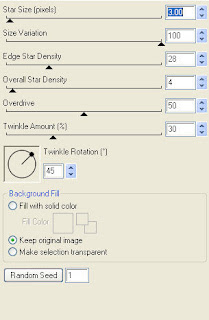
Copy and paste Tag with String 1, resize 50% & drop shadow. Position top right hand side. Copy and paste Old Clock, resize 40% and drop shadow. Position top right hand corner so it appears the tag is hanging from behind the clock.
Copy and paste Bow 6, resize 50% & drop shadow. Position bottom left hand corner. Copy and paste your tube, resize as necessary and drop shadow.
Copy and paste Glitter Leaves 1, resize 50%, rotate left 90 & drop shadow. Position along the bottom of your frame. Copy and paste Ribbon 1, resize 65% & drop shadow. Position along the bottom.
Copy and paste Ribbon 2, resize 65% & drop shadow. Position along the left hand side of your frame. Repeat with Ribbon 4, rotate left 90 and position with your other ribbon. Copy and paste Glitter Leaves 2, resize 50% & drop shadow. Position as well on the left hand side of your frame.
Copy and paste Note Sheet 1, resize 40%, rotate right 15 & drop shadow. Position botton left hand corner. Copy and paste Lock 1, resize 50% & drop shadow. Position bottom left hand corner on your note sheet. Repeat with Old Key 1 and position on your lock.
Copy and paste Butterfly 1, resize 30% & drop shadow. Position top left hand corner.
X out white background, merge visible. Open white background, resize to your liking (I have used 500x500).
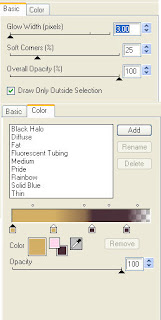
Add copyright and name on your tag. I have used CLB Thanksgiving, Size 60, color #482d36 and then added the same noise effect as used previously, followed by this gradient glow & drop shadow.
Save and you are done.
I hope you have enjoyed my tutorial.
Pls feel free to experiment and use my tutorial as a guide
This tutorial assumes you have a working knowledge of PSP.
Needed Supplies :
Tube of Choice .. I am using the work of Ismael Rac which you must have a license to use. Please do not use his work without purchasing through here.
Scrap Kit of Choice .. I have used a adorable PTU Kit from Stargazer Musings called "Fall Ever Friends" which can be purchased here.
Mask of Choice .. I haved used WSL_Mask275 & WSL_Mask328 which can be downloaded here.
Font of Choice .. CLB Thanksgiving
Let's get started
New image 600x600 and floodfill with white. New raster layer, select all, paste into selection Paper 3. Select none. New mask layer from image, WSL_Mask275, invert transparency unchecked, and merge group.
On your first mask layer only, adjust/add remove noise/add noise/uniform monochrome checked/25%.
Repeat with Paper 19 and using mask WSL_Mask328. Layer duplicate and merge down both green layers.
Repeat with Paper 22 and using mask WSL_Mask328. Layer duplicate, merge down both yellow layers and mirror.
Copy and paste Lace Frame 1 and resize 65%. Using your magic wand, select the center portion of your frame, selections modify/expand 5. Copy and paste Paper 39 below your frame layer, selections invert and hit delete.
Drop shadow your frame. I have used 2/2/40/4 throughout. Merge down your frame with it's background. I then added the following Xenofex/Constellation effect.

Copy and paste Tag with String 1, resize 50% & drop shadow. Position top right hand side. Copy and paste Old Clock, resize 40% and drop shadow. Position top right hand corner so it appears the tag is hanging from behind the clock.
Copy and paste Bow 6, resize 50% & drop shadow. Position bottom left hand corner. Copy and paste your tube, resize as necessary and drop shadow.
Copy and paste Glitter Leaves 1, resize 50%, rotate left 90 & drop shadow. Position along the bottom of your frame. Copy and paste Ribbon 1, resize 65% & drop shadow. Position along the bottom.
Copy and paste Ribbon 2, resize 65% & drop shadow. Position along the left hand side of your frame. Repeat with Ribbon 4, rotate left 90 and position with your other ribbon. Copy and paste Glitter Leaves 2, resize 50% & drop shadow. Position as well on the left hand side of your frame.
Copy and paste Note Sheet 1, resize 40%, rotate right 15 & drop shadow. Position botton left hand corner. Copy and paste Lock 1, resize 50% & drop shadow. Position bottom left hand corner on your note sheet. Repeat with Old Key 1 and position on your lock.
Copy and paste Butterfly 1, resize 30% & drop shadow. Position top left hand corner.
X out white background, merge visible. Open white background, resize to your liking (I have used 500x500).
Add copyright and name on your tag. I have used CLB Thanksgiving, Size 60, color #482d36 and then added the same noise effect as used previously, followed by this gradient glow & drop shadow.

Save and you are done.
I hope you have enjoyed my tutorial.
Pls feel free to experiment and use my tutorial as a guide
Subscribe to:
Posts (Atom)
Kits & Tuts





Blogs I Love