About Me
My hobbies are PSP.
I love helping my friends who are starting with PSP.
Any similarity or resemblance to any other tutorial is purely coincidental and unintentional. Pls do not recopy my tutorials anywhere. Many thanks Susan.


Credit
Blinkie created by Rabid Designz. She does some amazing work ! Thanks so much Melissa.

Blinkie created by my long time friend tweety here. Thanks so much my friend :)
My blog was designed By Alika's Scraps. Thanks so much. You did an amazing job !

Saturday, October 15, 2011
 Witches Brew Collaboration at Heartfelt Perfections
9:43 PM | Posted by
Shal |
 Edit Post
Edit Post

The Heartfelt Shop Designers have come together through alot of hard work and endless hours of no sleep to bring you all a wonderful and huge collab just in time for Halloween
This collab is chock full of Papers, Scrap Kits, Cu Products & Pu Products
Over 150 Papers
Over 325 Elements
Over 6 Cu packs
2 Word Art Packs
5 Cu Paper Packs
Very Large Mega Collab
There is Tagger Size & Fullsize Products included
So many goodies for every Halloween inspired project
Designers Include:
Leigh Penrod, Angels Designs, Lins Creations, Kitty Scrap Post, Myst Designs, Heaven Dreams, BeDeSign, Broken Sky Designs, Creations by Sanie, Kirsty Scraps, ChiChi Designs, Coh Scraps, Busy Scrappin, Scrappin With Lori Kay, Scrappin With Lil Ole Me, Designs by Chance, Grant Design Posers, Kims Corner, Lady Hawwk Designs, Red Butterfly, Stargazer Musings, This and That Designs,
Swheat Creations, Butterfly Kisses, Wilma4Ever, Lady Noelle Buttons and bows, Bello Scarto, Shal's World, ABC Creations, Alikas Scraps & A Cowgirl's Creations
Can be yours free with any $10 Purchase to the shop or you can purchase seperately for just $10 still a great deal for all that you get !

 Labels:

Twilight Saga Blog Train at Wilma4ever
9:33 PM | Posted by
Shal |
Edit Post
Edit Post
Welcome to my portion of the Wilma4Ever "Twilight Saga" Blog Train! Please
remember that we're all on different time zones, so just come back if the other
designers do not have their parts up yet. And remember to leave some love for
the designers! Continue following the Blog Train from the list below:
Wilma4Ever Store Blog (train station)
Ariasparkle
ABCreations
Becky's Creations
A Tagger's Scrap
HF-Projekte
Moody Designz
Luscious Digi Dolls
Scrappin' Wright
MamaLLamaLisaDesigns
Anita
April the Scrapaholic
Shal's World

You can download my portion here.
It's Halloween Tut
12:05 AM | Posted by
Shal |
Edit Post
Edit Post
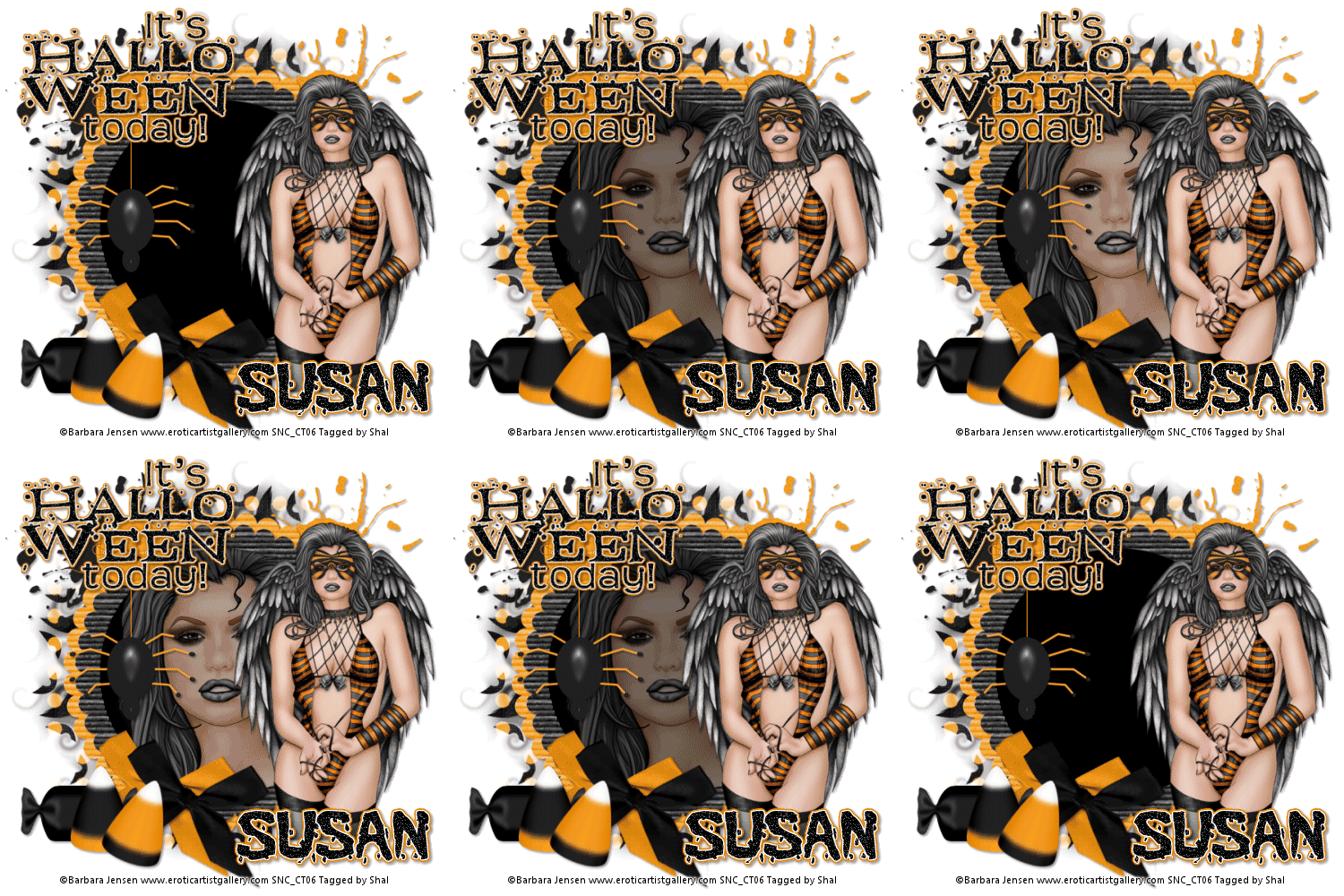
Feel free to use my tutorial as a guide and have fun giving it your own spin.
This tutorial assumes you have a working knowledge of PSP.
Needed Supplies & Filters :
Tube of Choice .. I am using the work of Barbara Jensen which you must have a license to use. Please do not use this work without purchasing through SNC here.
This particular image is an exclusive available only through SNC.
Scrap Kit of Choice .. I have used my FTU Kit for Creative Misfits called "Boo To You" which can be downloaded here.
Mask of Choice .. I have used Vix_MaskHalloween0901 which can be downloaded from Vix here.
Word Art of Choice .. I have used a great word art from Elegant WordArt which you can download here.
Font of Choice .. I have used Blood Feast
Let's get started !
New image 600x600 and floodfill with white. New raster layer, select all, paste into selection Paper 9. Select none. New mask layer from image, Vix_MaskHalloween0901, invert transparency unchecked, and merge group.
Copy and paste Splat 2, resize 65% & drop shadow. I have used 2/2/40/4 throughout. Position top right hand corner. Repeat with Splat 1 and position on the top left hand side.
Copy and paste Frame 2 & resize 65%. Copy and paste Frame 1 & resize 60%. Using your magic wand, select the center portion of your frame, selections modify/expand 6, new raster layer below your frame layers and floodfill with black. Do not deselect.
Selections invert, copy and paste your tube closeup, hit delete & Select none.
Duplicate this tube layer 8 times and rename your layers 1 through 9. We will need change the opacity on each layer so that we can achieve the fading in and out of the tube layer. On layer 1 reduce opacity to 0, layer 2 to 25, layer 3 to 50, layer 4 to 75, layer 5 keep 100, layer 6 to 75, layer 7 to 50, layer 8 to 25 and layer 9 to 0. If you choose not to animate your tag, then skip the duplicate portion.
Drop shadow your frame layers.
Copy and paste Bow 2, resize 50%, rotate right 20, drop shadow and position bottom left hand corner of your frame. Repeat with Bow 1 and position next to your first bow.
Copy and paste your tube, resize as necessary, drop shadow and position on the right hand side of your frame.
Copy and paste Candy 1, resize 40%, drop shadow & position bottom left hand corner.
Copy and paste Candy 5, resize 40%, drop shadow & position bottom left hand corner. Repeat with Candy 6, rotating right 20.
Copy and paste Spider 2, resize 50%, drop shadow & position hanging on the left hand side of the frame. Repeat with Button 2 and position at the top of your spider so it appears to be hanging from the button.
Copy and paste Word art & resize 40% twice. Adjust/add remove noise/add noise/random monochrome checked/50% & I then added the following gradient glow & then drop shadow.
This tutorial assumes you have a working knowledge of PSP.
Needed Supplies & Filters :
Tube of Choice .. I am using the work of Barbara Jensen which you must have a license to use. Please do not use this work without purchasing through SNC here.
This particular image is an exclusive available only through SNC.
Scrap Kit of Choice .. I have used my FTU Kit for Creative Misfits called "Boo To You" which can be downloaded here.
Mask of Choice .. I have used Vix_MaskHalloween0901 which can be downloaded from Vix here.
Word Art of Choice .. I have used a great word art from Elegant WordArt which you can download here.
Font of Choice .. I have used Blood Feast
Let's get started !
New image 600x600 and floodfill with white. New raster layer, select all, paste into selection Paper 9. Select none. New mask layer from image, Vix_MaskHalloween0901, invert transparency unchecked, and merge group.
Copy and paste Splat 2, resize 65% & drop shadow. I have used 2/2/40/4 throughout. Position top right hand corner. Repeat with Splat 1 and position on the top left hand side.
Copy and paste Frame 2 & resize 65%. Copy and paste Frame 1 & resize 60%. Using your magic wand, select the center portion of your frame, selections modify/expand 6, new raster layer below your frame layers and floodfill with black. Do not deselect.
Selections invert, copy and paste your tube closeup, hit delete & Select none.
Duplicate this tube layer 8 times and rename your layers 1 through 9. We will need change the opacity on each layer so that we can achieve the fading in and out of the tube layer. On layer 1 reduce opacity to 0, layer 2 to 25, layer 3 to 50, layer 4 to 75, layer 5 keep 100, layer 6 to 75, layer 7 to 50, layer 8 to 25 and layer 9 to 0. If you choose not to animate your tag, then skip the duplicate portion.
Drop shadow your frame layers.
Copy and paste Bow 2, resize 50%, rotate right 20, drop shadow and position bottom left hand corner of your frame. Repeat with Bow 1 and position next to your first bow.
Copy and paste your tube, resize as necessary, drop shadow and position on the right hand side of your frame.
Copy and paste Candy 1, resize 40%, drop shadow & position bottom left hand corner.
Copy and paste Candy 5, resize 40%, drop shadow & position bottom left hand corner. Repeat with Candy 6, rotating right 20.
Copy and paste Spider 2, resize 50%, drop shadow & position hanging on the left hand side of the frame. Repeat with Button 2 and position at the top of your spider so it appears to be hanging from the button.
Copy and paste Word art & resize 40% twice. Adjust/add remove noise/add noise/random monochrome checked/50% & I then added the following gradient glow & then drop shadow.

At this point if you need to, resize your tag. I have used 500x500. Add your copyright and name. I have used Blood Feast, Size 48, color black with the same noise, gradient glow and drop shadow as the word art.
If you are choosing not to animate, then you can save your tag.
To animate, close off Tube layers 2 through 9 (the lil eye icon in your layer palette), Edit/Copy Merged and paste as new animation in Animation Shop. Close off Tube Layer 1 and open Tube Layer 2, Edit/Copy Merged and paste after current frame in AS. Close off Tube Layer 2 and open Tube Layer 3, Edit/Copy Merged and paste after current frame in AS. Continue in this manner until you have added all 9 to AS.
You can now modify your frame properties to achieve the speed of animation you like. I have used the following. In AS, edit/select all, animation/frame properties and change to 35. Edit/select none. Then select only Frame 5 by clicking once on it. You will see a blue frame around it to know you have the right one. Animation/frame properties and change to 75.
Save as a gif.
I hope you have enjoyed my tutorial.
Pls feel free to experiment and use my tutorial as a guide.
Please feel free to send me your results.
I'd love to see what you came up with.
I hope you have enjoyed my tutorial.
Pls feel free to experiment and use my tutorial as a guide.
Please feel free to send me your results.
I'd love to see what you came up with.
Monday, October 10, 2011
Love Me Hate Me Tut
4:34 PM | Posted by
Shal |
Edit Post
Edit Post

Feel free to use my tutorial as a guide and have fun giving it your own spin.
This tutorial assumes you have a working knowledge of PSP.
Needed Supplies :
Tube of Choice .. I am using the work of Misa which you must have a license to use. Please do not use this work without purchasing through SNC here.
This particular image is an exclusive available only through SNC.
Scrap Kit of Choice .. I have used a PTU Kit from Kim's Korner called "Love Me/Hate Me" which can be purchased here.
Mask of Choice .. I have used WSL_Mask222 which can be downloaded here.
Font of Choice .. A Trip to Hell and Back
Let's get started
New image 600x600 and floodfill with white. New raster layer, select all, paste into selection Paper 18. Select none. New mask layer from image, WSL_Mask222, invert transparency unchecked, and merge group.
Copy and paste Ribbon 3, resize 75% & Drop shadow. I have used 2/2/40/4 throughout. Position on the right hand side. Layer duplicate mirror.
Copy and paste Blood Splatter, adjust/add remove noise/add noise/uniform monochrome checked/50% & drop shadow. Position top left hand corner. Layer duplicate & flip/mirror.
Copy and paste Heart Doodle, resize 65% & drop shadow. Position bottom left hand corner. Layer duplicate, mirror and position top right hand corner.
Copy and paste Heart 8. I then added a size 5 fat color #c0080b gradient glow & then drop shadow. Copy and paste Heart 9, resize 65% & drop shadow. Position bottom left hand corner. Layer duplicate & mirror.
Copy and paste Heart 3, resize 65% & drop shadow. Position top right hand corner.
Copy and paste Scroll, resize 50%, rotate left 5 & drop shadow. Position top left hand corner.
Copy and paste your tube, resize as necessary & then drop shadow.
Copy and paste Bow 1, resize 65 & drop shadow. Position at the bottom centre of your tube.
Copy and paste Heart 2, resize 50% & drop shadow. Position bottom right hand corner.
Copy and paste Teddy, resize 65% & drop shadow. Position bottome left hand corner.
Copy and paste Heart Brad 2, resize 40% & drop shadow. Position next to your teddy.
Copy and paste Button 3, resize 40% & drop shadow. Position at the top right hand corner of your scroll.
X out white background, merge visible. Open white background, resize to your liking (I have used 500x500).
Add copyright and name on your tag. I have used A Trip to Hell and Back, Size 48, color black and then added a size 5 fat color #c0080b gradient glow, followed by a size 5 fat white gradient glow and then drop shadow.
Save and you are done.
I hope you have enjoyed my tutorial.
Pls feel free to experiment and use my tutorial as a guide
This tutorial assumes you have a working knowledge of PSP.
Needed Supplies :
Tube of Choice .. I am using the work of Misa which you must have a license to use. Please do not use this work without purchasing through SNC here.
This particular image is an exclusive available only through SNC.
Scrap Kit of Choice .. I have used a PTU Kit from Kim's Korner called "Love Me/Hate Me" which can be purchased here.
Mask of Choice .. I have used WSL_Mask222 which can be downloaded here.
Font of Choice .. A Trip to Hell and Back
Let's get started
New image 600x600 and floodfill with white. New raster layer, select all, paste into selection Paper 18. Select none. New mask layer from image, WSL_Mask222, invert transparency unchecked, and merge group.
Copy and paste Ribbon 3, resize 75% & Drop shadow. I have used 2/2/40/4 throughout. Position on the right hand side. Layer duplicate mirror.
Copy and paste Blood Splatter, adjust/add remove noise/add noise/uniform monochrome checked/50% & drop shadow. Position top left hand corner. Layer duplicate & flip/mirror.
Copy and paste Heart Doodle, resize 65% & drop shadow. Position bottom left hand corner. Layer duplicate, mirror and position top right hand corner.
Copy and paste Heart 8. I then added a size 5 fat color #c0080b gradient glow & then drop shadow. Copy and paste Heart 9, resize 65% & drop shadow. Position bottom left hand corner. Layer duplicate & mirror.
Copy and paste Heart 3, resize 65% & drop shadow. Position top right hand corner.
Copy and paste Scroll, resize 50%, rotate left 5 & drop shadow. Position top left hand corner.
Copy and paste your tube, resize as necessary & then drop shadow.
Copy and paste Bow 1, resize 65 & drop shadow. Position at the bottom centre of your tube.
Copy and paste Heart 2, resize 50% & drop shadow. Position bottom right hand corner.
Copy and paste Teddy, resize 65% & drop shadow. Position bottome left hand corner.
Copy and paste Heart Brad 2, resize 40% & drop shadow. Position next to your teddy.
Copy and paste Button 3, resize 40% & drop shadow. Position at the top right hand corner of your scroll.
X out white background, merge visible. Open white background, resize to your liking (I have used 500x500).
Add copyright and name on your tag. I have used A Trip to Hell and Back, Size 48, color black and then added a size 5 fat color #c0080b gradient glow, followed by a size 5 fat white gradient glow and then drop shadow.
Save and you are done.
I hope you have enjoyed my tutorial.
Pls feel free to experiment and use my tutorial as a guide
Designer of the Month at Wilma4ever !!!
2:15 PM | Posted by
Shal |
Edit Post
Edit Post

This month I was chosen to be Designer of the Month at Wilma4ever ! So pls take a minute to visit my store there and see everything that is happening. All month long, any item over $1.00 will be 40% off and as a bonus for any 1$ purchase you will receive my Winter Bundle as a gift. As always don't forget to check out the Weekend Deals to be had for only 1$ every Friday to Sunday.

Tut using my FTU "Be A Fighter" Scrap Kit
2:07 PM | Posted by
Shal |
Edit Post
Edit Post

Jeannine from Funky Sweet Designs wrote this gorgeous tutorial using my FTU "Be A Fighter" Scrap Kit ! Thanks so much for using my kit Jeannine .. you've done an amazing job. You can find the tutorial on her blog here.
FTU Forum Exclusive Halloween Kit !!!
2:01 PM | Posted by
Shal |
Edit Post
Edit Post

Available exclusively on the SNC forum is this lil spooky Halloween themed scrap kit "Happy Haunting".
So hope on over to their forum and see all the fun stuff going on there !
Subscribe to:
Posts (Atom)
Kits & Tuts





Blogs I Love