About Me
My hobbies are PSP.
I love helping my friends who are starting with PSP.
Any similarity or resemblance to any other tutorial is purely coincidental and unintentional. Pls do not recopy my tutorials anywhere. Many thanks Susan.


Credit
Blinkie created by Rabid Designz. She does some amazing work ! Thanks so much Melissa.

Blinkie created by my long time friend tweety here. Thanks so much my friend :)
My blog was designed By Alika's Scraps. Thanks so much. You did an amazing job !

Monday, December 19, 2011
 Tutorial using my "Christmas Cookies" Tagger Size Kit
2:10 PM | Posted by
Shal |
 Edit Post
Edit Post

My dearest friend tweety wrote this great tutorial using my "Christmas Cookies" Tagger Size Kit. I absolutely love it ! Just gorgeous ! Thanks so much my sweet friend. You can find the tutorial here.
 Labels:

Sunday, December 18, 2011
9:48 PM | Posted by
Shal |
Edit Post
Edit Post

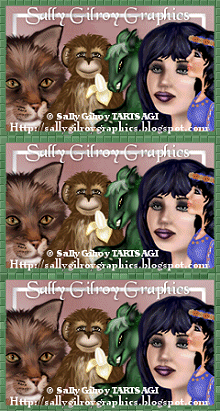
Sally Gilroy created this gorgeous tag using my Color Me Happy Tagger Size Kit. Thanks so much my friend it's just gorgeous !
Tutorial using my "Christmas Cheer" Tagger Size Kit
9:30 PM | Posted by
Shal |
Edit Post
Edit Post

Crystal from Crystal's Creations wrote this gorgeous tutorial using my Christmas Cheer Tagger Size Kit. You can find the tutorial on her blog here. Thanks so much .. I love it !
Tags using my "Christmas Cheer" Tagger Size Kit
9:04 PM | Posted by
Shal |
Edit Post
Edit Post

Lesia at Deadly Desire Tagz created this gorgeous set of extras using my Christmas Cheer Tagger Size Kit. You can find the complete set on her blog here. Thanks so much .. these are gorgeous !

K'Lani at Tutorials by K'Lani created this gorgeous tag using my Christmas Cheer Tagger Size Kit as well. Thanks so much .. I love it !

K'Lani at Tutorials by K'Lani created this gorgeous tag using my Christmas Cheer Tagger Size Kit as well. Thanks so much .. I love it !
Saturday, December 17, 2011
Steampunk Christmas Tut
8:27 PM | Posted by
Shal |
Edit Post
Edit Post

Feel free to use my tutorial as a guide and have fun giving it your own spin.
This tutorial assumes you have a working knowledge of PSP.
Needed Supplies :
Tube of Choice .. I am using the work of Caron Vinson which you must have a license to use. Please do not use her work without purchasing through CDO here.
Scrap Kit of Choice .. I have used a PTU Kit from Tootypup called "Vintage Christmas Steampunk" which can be purchased here.
Mask of Choice .. I have used WSL_Mask74 by weescotslass which can be downloaded here.
Font of Choice .. Steampunk
Let's get started
New image 600x600 and floodfill with white. New raster layer, select all, paste into selection Paper 2. Select none. New mask layer from image, WSL_Mask76, invert transparency unchecked, and merge group. Layer duplicate & merge down both mask layers.
New raster layer, select all, paste into selection Paper 10. Select none. New mask layer from image, WSL_Mask366, invert transparency unchecked, and merge group. Resize 115%.
Duplicate twice and rename your layers Mask 1,2 and 3. On your first Mask layer apply Dsb Flux/Bright Noise/65. On your 2nd layer, apply bright noise again, hitting mix twice. On your 3rd layer, apply again hitting mix 3 times. If you are deciding not to animate, skip this part of the tutorial
Copy and paste Bronze Gear 4 & resize 65%. Using your magic wand, select the center portion of your frame, selections modify/expand 5, copy and paste Paper 9 below your frame layer, resize 65%, selections invert and hit delete. Select none and drop shadow your frame. I have used 2/2/40/4 throughout.
Copy and paste Clock 7, resize 50% & drop shadow. Position along the top of your frame. Copy and paste Christmas Carol 7, resize 40% & drop shadow. Position bottom right hand corner.
Copy and paste Christmas Bauble 7, resize 65% & drop shadow. I then trimmed the top part of the chain and positioned on the left hand side. Copy and paste Holly 4, resize 15%, flip & drop shadow. Position at the top of your bauble chain.
Copy and paste your tube, mirror & resize if necessary & drop shadow. Copy and paste Deco 1, resize 50% & drop shadow. Position along the bottom.
At this point if you need to, resize your tag. I have used 500x500. Add your copyright and name. I have used Steampunk, size 48, color #baa061. I then added a noise effect .. adjust/add remove noise/add noise/uniform monochrome checked/50% and added a size 8 fat color #5d2520 gradient glow followed by drop shadow.
If you are choosing not to animate, then you can save your tag.
To animate, close off Mask Layers 2 & 3 (the lil eye icon in your layer palette), Edit/Copy Merged and paste as new animation in Animation Shop. Close off Mask Layer 1 and open Mask Layer 2, Edit/Copy Merged and paste after current frame in AS. Close off Mask Layer 2 and open Mask Layer 3, Edit/Copy Merged and paste after current frame in AS.
Save as a gif.
I hope you have enjoyed my tutorial.
Pls feel free to experiment and use my tutorial as a guide.
Please feel free to send me your results.
I'd love to see what you came up with.
This tutorial assumes you have a working knowledge of PSP.
Needed Supplies :
Tube of Choice .. I am using the work of Caron Vinson which you must have a license to use. Please do not use her work without purchasing through CDO here.
Scrap Kit of Choice .. I have used a PTU Kit from Tootypup called "Vintage Christmas Steampunk" which can be purchased here.
Mask of Choice .. I have used WSL_Mask74 by weescotslass which can be downloaded here.
Font of Choice .. Steampunk
Let's get started
New image 600x600 and floodfill with white. New raster layer, select all, paste into selection Paper 2. Select none. New mask layer from image, WSL_Mask76, invert transparency unchecked, and merge group. Layer duplicate & merge down both mask layers.
New raster layer, select all, paste into selection Paper 10. Select none. New mask layer from image, WSL_Mask366, invert transparency unchecked, and merge group. Resize 115%.
Duplicate twice and rename your layers Mask 1,2 and 3. On your first Mask layer apply Dsb Flux/Bright Noise/65. On your 2nd layer, apply bright noise again, hitting mix twice. On your 3rd layer, apply again hitting mix 3 times. If you are deciding not to animate, skip this part of the tutorial
Copy and paste Bronze Gear 4 & resize 65%. Using your magic wand, select the center portion of your frame, selections modify/expand 5, copy and paste Paper 9 below your frame layer, resize 65%, selections invert and hit delete. Select none and drop shadow your frame. I have used 2/2/40/4 throughout.
Copy and paste Clock 7, resize 50% & drop shadow. Position along the top of your frame. Copy and paste Christmas Carol 7, resize 40% & drop shadow. Position bottom right hand corner.
Copy and paste Christmas Bauble 7, resize 65% & drop shadow. I then trimmed the top part of the chain and positioned on the left hand side. Copy and paste Holly 4, resize 15%, flip & drop shadow. Position at the top of your bauble chain.
Copy and paste your tube, mirror & resize if necessary & drop shadow. Copy and paste Deco 1, resize 50% & drop shadow. Position along the bottom.
At this point if you need to, resize your tag. I have used 500x500. Add your copyright and name. I have used Steampunk, size 48, color #baa061. I then added a noise effect .. adjust/add remove noise/add noise/uniform monochrome checked/50% and added a size 8 fat color #5d2520 gradient glow followed by drop shadow.
If you are choosing not to animate, then you can save your tag.
To animate, close off Mask Layers 2 & 3 (the lil eye icon in your layer palette), Edit/Copy Merged and paste as new animation in Animation Shop. Close off Mask Layer 1 and open Mask Layer 2, Edit/Copy Merged and paste after current frame in AS. Close off Mask Layer 2 and open Mask Layer 3, Edit/Copy Merged and paste after current frame in AS.
Save as a gif.
I hope you have enjoyed my tutorial.
Pls feel free to experiment and use my tutorial as a guide.
Please feel free to send me your results.
I'd love to see what you came up with.
Girls Just Wanna Have Fun Tut
4:14 PM | Posted by
Shal |
Edit Post
Edit Post

Feel free to use my tutorial as a guide and have fun giving it your own spin.
This tutorial assumes you have a working knowledge of PSP.
Needed Supplies :
Tube of Choice .. I am using the work of Rebelle Doll which you must have a license to use. Please do not use this work without purchasing through SNC here.
Scrap Kit of Choice .. I have used a FTU Kit from Fantasy Moments "Amazonia" which can be downloaded here.
Mask of Choice .. I have used WSL_Mask74 by weescotslass which can be downloaded here.
Word art of Choice .. I have used word art by Aussie Scrap Designs which can be downloaded here.
Font of Choice .. Cutie Pie
Let's get started
New image 600x600 and floodfill with white. New raster layer, select all, paste into selection Paper 30. Select none. New mask layer from image, WSL_Mask74, invert transparency unchecked, and merge group. Resize 105%.
Copy and paste Element 17 & resize 20%. Using the following Mura's Meister/Copies setting, create a flower frame & then resize 90%.
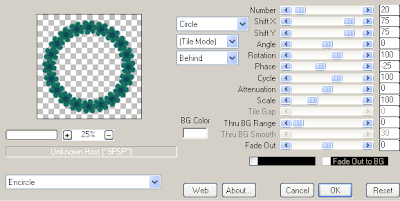
Select all/float/defloat and apply the following Xenofex/Constellation setting.
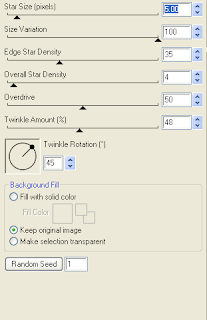
Using your magic wand, select the center portion of your frame, selections modify/expand 15, copy and paste Paper 14 below your frame layers, selections invert and hit delete. Copy and paste Element 35, resize 75% & hit delete. Select none and drop shadow your frame & raindrops layers. I have used 2/2/40/4 throughout.
Copy and paste Element 21, resize 30% & drop shadow. Position bottom left hand corner of your frame. Repeat with Element 22 & 23 and position next to your first bow flower.
Copy and paste Element 70, resize 50% & drop shadow. Positiom bottom centre of your frame. Copy and paste Element 4, resize 75% & drop shadow. Position in the centre of yoru bow. Copy and paste Element 58, resize 65%, mirror & drop shadow. Position top right hand corner.
Copy and paste your tube, resize as necessary & drop shadow.
Copy and paste Element 72, resize 50% & drop shadow. Position bottom right hand corner.
Copy and paste your Word art and I then added a size 3 fat white gradient glow followed by drop shadow.
X out white background, merge visible. Open white background, resize to your liking (I have used 500x500).
Add copyright and name on your tag. I have used CutiePie, Size 60, color black, then added the same gradient and drop shadow as with the word art.
Save and you are done.
I hope you have enjoyed my tutorial.
Pls feel free to experiment and use my tutorial as a guide.
This tutorial assumes you have a working knowledge of PSP.
Needed Supplies :
Tube of Choice .. I am using the work of Rebelle Doll which you must have a license to use. Please do not use this work without purchasing through SNC here.
Scrap Kit of Choice .. I have used a FTU Kit from Fantasy Moments "Amazonia" which can be downloaded here.
Mask of Choice .. I have used WSL_Mask74 by weescotslass which can be downloaded here.
Word art of Choice .. I have used word art by Aussie Scrap Designs which can be downloaded here.
Font of Choice .. Cutie Pie
Let's get started
New image 600x600 and floodfill with white. New raster layer, select all, paste into selection Paper 30. Select none. New mask layer from image, WSL_Mask74, invert transparency unchecked, and merge group. Resize 105%.
Copy and paste Element 17 & resize 20%. Using the following Mura's Meister/Copies setting, create a flower frame & then resize 90%.

Select all/float/defloat and apply the following Xenofex/Constellation setting.

Using your magic wand, select the center portion of your frame, selections modify/expand 15, copy and paste Paper 14 below your frame layers, selections invert and hit delete. Copy and paste Element 35, resize 75% & hit delete. Select none and drop shadow your frame & raindrops layers. I have used 2/2/40/4 throughout.
Copy and paste Element 21, resize 30% & drop shadow. Position bottom left hand corner of your frame. Repeat with Element 22 & 23 and position next to your first bow flower.
Copy and paste Element 70, resize 50% & drop shadow. Positiom bottom centre of your frame. Copy and paste Element 4, resize 75% & drop shadow. Position in the centre of yoru bow. Copy and paste Element 58, resize 65%, mirror & drop shadow. Position top right hand corner.
Copy and paste your tube, resize as necessary & drop shadow.
Copy and paste Element 72, resize 50% & drop shadow. Position bottom right hand corner.
Copy and paste your Word art and I then added a size 3 fat white gradient glow followed by drop shadow.
X out white background, merge visible. Open white background, resize to your liking (I have used 500x500).
Add copyright and name on your tag. I have used CutiePie, Size 60, color black, then added the same gradient and drop shadow as with the word art.
Save and you are done.
I hope you have enjoyed my tutorial.
Pls feel free to experiment and use my tutorial as a guide.
Monday, December 12, 2011
Let It Snow Tut
7:42 PM | Posted by
Shal |
Edit Post
Edit Post
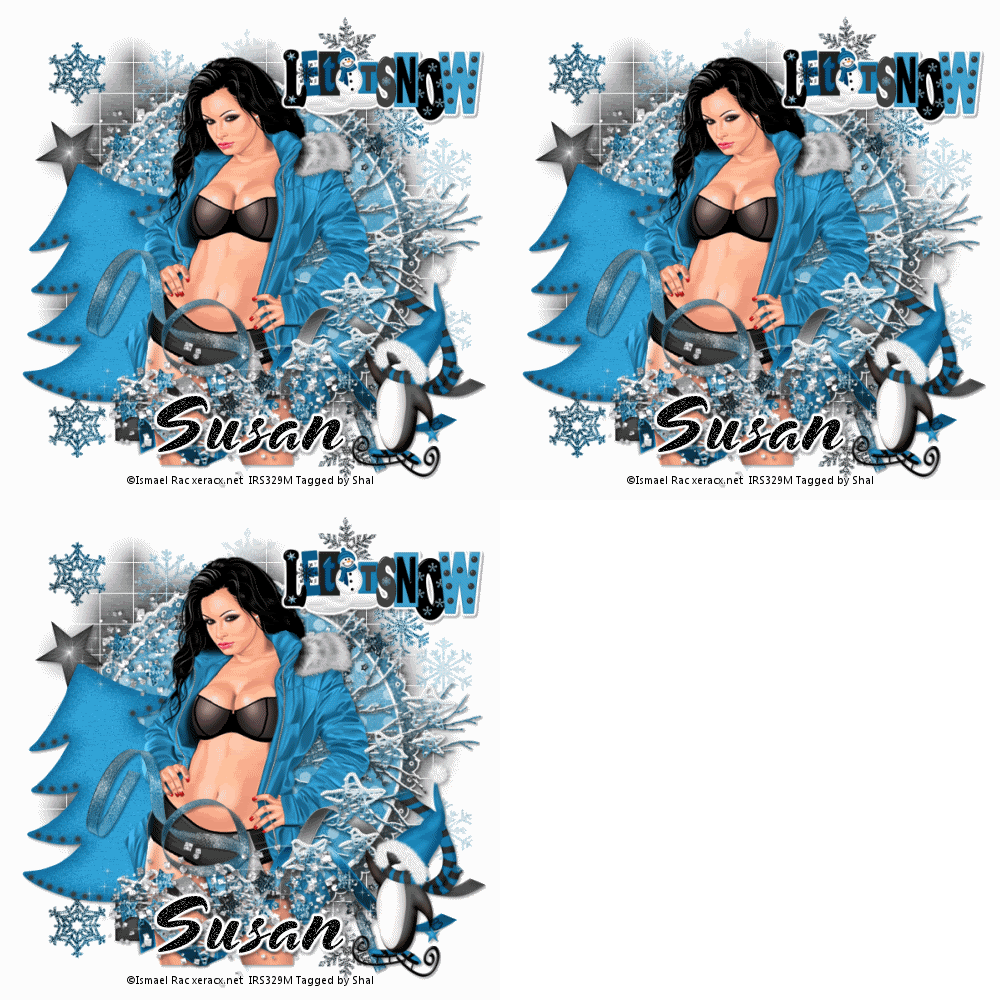
Feel free to use my tutorial as a guide and have fun giving it your own spin.
This tutorial assumes you have a working knowledge of PSP.
Needed Supplies :
Tube of Choice .. I am using the work of Ismael Rac which you must have a license to use. Please do not use his work without purchasing through here.
Scrap Kit of Choice .. I have used a PTU kit from Alika called "Dark Side of the Icicle" which can be purchased here.
Mask of Choice .. I have used WSL_Mask84 & Vix_Mask 306 which can be downloaded here & here.
Font of Choice .. Snowblind
Let's get started
New image 600x600 and floodfill with white. New raster layer, select all, paste into selection Paper 7. New mask layer from image, WSL_Mask84, invert transparency unchecked, and merge group.
New raster layer, select all, paste into selection Paper 13. Select none. New mask layer from image, Vix_Mask306, invert transparency unchecked, and merge group. Layer duplicate, flip & merge down both mask layers.
Duplicate twice and rename your layers Mask 1,2 and 3. On your first Mask layer apply the following Xenofex/Constellation. If you are deciding not to animate, skip this part of the tutorial.
On your first Mask layer apply Dsb Flux/Bright Noise/65. On your 2nd layer, apply bright noise again, hitting mix twice. On your 3rd layer, apply again hitting mix 3 times.
Copy and paste Element 65 & resize 85%. Using your magic wand, select the center portion of your frame, selections modify/expand 5, copy and paste Paper 4 below your frame layers, selections invert and hit delete. Select none and drop shadow your frame. I have used 2/2/40/4 throughout.
Copy and paste Element 15, mirror & drop shadow. Position on the left hand side of your frame. Copy and paste Element 75, mirror & drop shadow. Position on the right hand side of your frame.
Copy and paste your tube, resize as necessary & drop shadow. Copy and paste Element 4, resize 50%, mirror & drop shadow. Position towards the bottom. Repeat with Element 3. Repeat with Element 49 (skipping the mirror).
Copy and paste Element 40, resize 65% & drop shadow. Position along the bottom going up the right hand side. Copy and paste Element 23 & drop shadow. Position towards the bottom. Layer duplicate & flip. Drag this layer below your tube layer and position along the top of your frame.
Copy and paste Element 78, resize 50%, add a size 3 fat white gradient glow followed by drop shadow. Position top right hand corner.
Copy and paste Element 80, resize 65% & drop shadow. Position bottom right hand corner.
At this point if you need to, resize your tag. I have used 500x500. Add your copyright and name. I have used Snowblind, size 60, color black. I then added a noise effect .. adjust/add remove noise/add noise/random monochrome checked/65% and added the same gradient glow and drop shadow as with the word art.
If you are choosing not to animate, then you can save your tag.
To animate, close off Mask Layers 2 & 3 (the lil eye icon in your layer palette), Edit/Copy Merged and paste as new animation in Animation Shop. Close off Mask Layer 1 and open Mask Layer 2, Edit/Copy Merged and paste after current frame in AS. Close off Mask Layer 2 and open Mask Layer 3, Edit/Copy Merged and paste after current frame in AS.
Save as a gif.
I hope you have enjoyed my tutorial.
Pls feel free to experiment and use my tutorial as a guide.
Please feel free to send me your results.
I'd love to see what you came up with.
This tutorial assumes you have a working knowledge of PSP.
Needed Supplies :
Tube of Choice .. I am using the work of Ismael Rac which you must have a license to use. Please do not use his work without purchasing through here.
Scrap Kit of Choice .. I have used a PTU kit from Alika called "Dark Side of the Icicle" which can be purchased here.
Mask of Choice .. I have used WSL_Mask84 & Vix_Mask 306 which can be downloaded here & here.
Font of Choice .. Snowblind
Let's get started
New image 600x600 and floodfill with white. New raster layer, select all, paste into selection Paper 7. New mask layer from image, WSL_Mask84, invert transparency unchecked, and merge group.
New raster layer, select all, paste into selection Paper 13. Select none. New mask layer from image, Vix_Mask306, invert transparency unchecked, and merge group. Layer duplicate, flip & merge down both mask layers.
Duplicate twice and rename your layers Mask 1,2 and 3. On your first Mask layer apply the following Xenofex/Constellation. If you are deciding not to animate, skip this part of the tutorial.
On your first Mask layer apply Dsb Flux/Bright Noise/65. On your 2nd layer, apply bright noise again, hitting mix twice. On your 3rd layer, apply again hitting mix 3 times.
Copy and paste Element 65 & resize 85%. Using your magic wand, select the center portion of your frame, selections modify/expand 5, copy and paste Paper 4 below your frame layers, selections invert and hit delete. Select none and drop shadow your frame. I have used 2/2/40/4 throughout.
Copy and paste Element 15, mirror & drop shadow. Position on the left hand side of your frame. Copy and paste Element 75, mirror & drop shadow. Position on the right hand side of your frame.
Copy and paste your tube, resize as necessary & drop shadow. Copy and paste Element 4, resize 50%, mirror & drop shadow. Position towards the bottom. Repeat with Element 3. Repeat with Element 49 (skipping the mirror).
Copy and paste Element 40, resize 65% & drop shadow. Position along the bottom going up the right hand side. Copy and paste Element 23 & drop shadow. Position towards the bottom. Layer duplicate & flip. Drag this layer below your tube layer and position along the top of your frame.
Copy and paste Element 78, resize 50%, add a size 3 fat white gradient glow followed by drop shadow. Position top right hand corner.
Copy and paste Element 80, resize 65% & drop shadow. Position bottom right hand corner.
At this point if you need to, resize your tag. I have used 500x500. Add your copyright and name. I have used Snowblind, size 60, color black. I then added a noise effect .. adjust/add remove noise/add noise/random monochrome checked/65% and added the same gradient glow and drop shadow as with the word art.
If you are choosing not to animate, then you can save your tag.
To animate, close off Mask Layers 2 & 3 (the lil eye icon in your layer palette), Edit/Copy Merged and paste as new animation in Animation Shop. Close off Mask Layer 1 and open Mask Layer 2, Edit/Copy Merged and paste after current frame in AS. Close off Mask Layer 2 and open Mask Layer 3, Edit/Copy Merged and paste after current frame in AS.
Save as a gif.
I hope you have enjoyed my tutorial.
Pls feel free to experiment and use my tutorial as a guide.
Please feel free to send me your results.
I'd love to see what you came up with.
Subscribe to:
Posts (Atom)
Kits & Tuts





Blogs I Love