About Me
My hobbies are PSP.
I love helping my friends who are starting with PSP.
Any similarity or resemblance to any other tutorial is purely coincidental and unintentional. Pls do not recopy my tutorials anywhere. Many thanks Susan.


Credit
Blinkie created by Rabid Designz. She does some amazing work ! Thanks so much Melissa.

Blinkie created by my long time friend tweety here. Thanks so much my friend :)
My blog was designed By Alika's Scraps. Thanks so much. You did an amazing job !

Sunday, May 6, 2012
 Love You Mum Tut
1:37 AM | Posted by
Shal |
 Edit Post
Edit Post

Feel free to use my tutorial as a guide and have fun giving it your own spin.
This tutorial assumes you have a working knowledge of PSP.
Needed Supplies :
Tube of Choice .. I am using the work of Suzanne Woolcott which you must have a license to use. Please do not use her work without purchasing through here.
Scrap Kit of Choice .. I have used a gorgeous PTU kit from Bubble's Dream called "Love You Mum!" which can be purchased here.
Mask of Choice .. I have used WSL_Mask84 which can be downloaded here.
Font of Choice .. Cutie Pie
Let's get started
New image 600x600 and floodfill with white. New raster layer, select all, copy and paste Paper 6, select none. New mask layer from image WSL_Mask84, invert transparency unchecked, and merge group. Resize 110%.
Copy and paste Element 26.
Copy and paste Element 19, drop shadow and position towards the top. I have used 2/2/40/4 throughout. Layer duplicate, mirror/flip.
Copy and paste Element 14 & resize 80%. Copy and paste Element 3, resize 85% & drop shadow. Erase areas where your background heart is wider than your pearl heart frame.
Copy and paste Element 1. Using your magic wand, select the center portion of your first frame, selections modify/expand 5, copy and paste Paper 16, resize 50%, selections invert and hit delete. Copy and paste your first tube and hit delete. Select none and drop shadow your tube. I have used 2/2/40/4 throughout.
Repeat for your 2nd frame using 17. Drop shadow your frame.
Copy and paste Element 12 & drop shadow. Position along the bottom. Repeat with Element 15. Position along the bottom as well.
Copy and paste Element 16, resize 65% & drop shadow. Position bottom left hand corner of your frame. Layer duplicate, mirror/flip.
Copy and paste Element 4, resize 45% & drop shadow. Position top left hand corner. Repeat with Element 8 and position bottom right hand corner.
Copy and paste 39,resize 75% & drop shadow. Position hanging from the left hand side.
Copy and paste Element 23 & drop shadow. Position top middle centre of your frames.
X out white background, merge visible. Open white background, resize to your liking (I have used 500x500).
Add copyright and name on your tag. I have used Cutie Pie, Size 60, Color #839565, adjust/add remove noise/add noise/uniform monochrome checked/35%. I then added a size 3 fat gradient glow followed by drop shadow.
Save and you are done.
I hope you have enjoyed my tutorial.
Pls feel free to experiment and use my tutorial as a guide.
This tutorial assumes you have a working knowledge of PSP.
Needed Supplies :
Tube of Choice .. I am using the work of Suzanne Woolcott which you must have a license to use. Please do not use her work without purchasing through here.
Scrap Kit of Choice .. I have used a gorgeous PTU kit from Bubble's Dream called "Love You Mum!" which can be purchased here.
Mask of Choice .. I have used WSL_Mask84 which can be downloaded here.
Font of Choice .. Cutie Pie
Let's get started
New image 600x600 and floodfill with white. New raster layer, select all, copy and paste Paper 6, select none. New mask layer from image WSL_Mask84, invert transparency unchecked, and merge group. Resize 110%.
Copy and paste Element 26.
Copy and paste Element 19, drop shadow and position towards the top. I have used 2/2/40/4 throughout. Layer duplicate, mirror/flip.
Copy and paste Element 14 & resize 80%. Copy and paste Element 3, resize 85% & drop shadow. Erase areas where your background heart is wider than your pearl heart frame.
Copy and paste Element 1. Using your magic wand, select the center portion of your first frame, selections modify/expand 5, copy and paste Paper 16, resize 50%, selections invert and hit delete. Copy and paste your first tube and hit delete. Select none and drop shadow your tube. I have used 2/2/40/4 throughout.
Repeat for your 2nd frame using 17. Drop shadow your frame.
Copy and paste Element 12 & drop shadow. Position along the bottom. Repeat with Element 15. Position along the bottom as well.
Copy and paste Element 16, resize 65% & drop shadow. Position bottom left hand corner of your frame. Layer duplicate, mirror/flip.
Copy and paste Element 4, resize 45% & drop shadow. Position top left hand corner. Repeat with Element 8 and position bottom right hand corner.
Copy and paste 39,resize 75% & drop shadow. Position hanging from the left hand side.
Copy and paste Element 23 & drop shadow. Position top middle centre of your frames.
X out white background, merge visible. Open white background, resize to your liking (I have used 500x500).
Add copyright and name on your tag. I have used Cutie Pie, Size 60, Color #839565, adjust/add remove noise/add noise/uniform monochrome checked/35%. I then added a size 3 fat gradient glow followed by drop shadow.
Save and you are done.
I hope you have enjoyed my tutorial.
Pls feel free to experiment and use my tutorial as a guide.
 Labels:

Saturday, May 5, 2012
Wired Differently Tut
11:08 PM | Posted by
Shal |
Edit Post
Edit Post

Feel free to use my tutorial as a guide and have fun giving it your own spin.
This tutorial assumes you have a working knowledge of PSP.
Needed Supplies :
Tube of Choice .. I am using the work of Lilith Morana which you must have a license to use. Please do not use her work without purchasing through The PSP Project here.
Scrap Kit of Choice .. I have used a gorgeous PTU kit from Kirsty's Scraps called "Gothic Nights" which can be purchased here.
Mask of Choice .. I have used WSL_Mask255 which can be downloaded here.
Word art of Choice .. I have used word art from Elegant Word Art which you can download here.
Font of Choice .. 2 Peas Rocky Shore
Let's get started
New image 600x600 and floodfill with white. New raster layer, select all, copy and paste Paper 8, select none. New mask layer from image WSL_Mask255, invert transparency unchecked, and merge group.
Copy and paste Heart 1 & resize 95%.
Copy and paste Frame 3 & resize 75%. Using your magic wand, select the center portion of your frame, selections modify/expand 5, copy and paste Paper 9, resize 50%, selections invert and hit delete. Select none and drop shadow your frame.
Copy and paste Frame 4, resize 85% & drop shadow.
Copy and paste Heart Scatter & resize 75%. Adjust/add remove noise/add noise/random monochrome checked/50% & drop shadow. I have used 2/2/40/4 throughout. Position top left hand corner.
Layer duplicate/mirror & position bottom right hand corner.
Copy and paste Tree, resize 85% & drop shadow. Position to the right of centre.
Copy and paste Leaves 3, resize 50%, rotate left 125 & drop shadow. Position on the left hand side towards the bottom. Copy and paste Mushroom, resize 50% & drop shadow. Position on your leaves. Copy and paste Cloud and position towards the bottom.
Copy and paste Ribbon 2, resize 75% & drop shadow. Position towards the bottom. Repeat with Ribbon 2, resizing 65%.
Copy and paste Twisted Pin & drop shadow. Position towards the bottom. Layer duplicate & rotate left 90.
Copy and paste Flower 2, resize 40% & drop shadow. Position bottom left hand corner. Copy and paste Butterfly, resize 50% & drop shadow. Position bottom left hand corner on your red flower.
Copy and paste Floaties & resize 75%. Position on the right hand side towards the top. Layer duplicate & mirror. Layer duplicate and rotate left 90. Position towards the bottom.
Copy and paste Raven, resize 40% & drop shadow. Position sitting on a tree branch.
Copy and paste your tube, resize as necessary & drop shadow.
Copy and paste your word art and resize 35% twice. I then added the following gradient glow & then drop shadow.
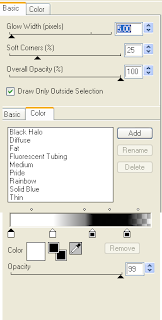
X out white background, merge visible. Open white background, resize to your liking (I have used 500x500).
Add copyright and name on your tag. I have used 2 Peas Rocky Shore, Size 60, Color black and then the same gradient glow as with the word art followed by drop shadow.
Save and you are done.
I hope you have enjoyed my tutorial.
Pls feel free to experiment and use my tutorial as a guide.
This tutorial assumes you have a working knowledge of PSP.
Needed Supplies :
Tube of Choice .. I am using the work of Lilith Morana which you must have a license to use. Please do not use her work without purchasing through The PSP Project here.
Scrap Kit of Choice .. I have used a gorgeous PTU kit from Kirsty's Scraps called "Gothic Nights" which can be purchased here.
Mask of Choice .. I have used WSL_Mask255 which can be downloaded here.
Word art of Choice .. I have used word art from Elegant Word Art which you can download here.
Font of Choice .. 2 Peas Rocky Shore
Let's get started
New image 600x600 and floodfill with white. New raster layer, select all, copy and paste Paper 8, select none. New mask layer from image WSL_Mask255, invert transparency unchecked, and merge group.
Copy and paste Heart 1 & resize 95%.
Copy and paste Frame 3 & resize 75%. Using your magic wand, select the center portion of your frame, selections modify/expand 5, copy and paste Paper 9, resize 50%, selections invert and hit delete. Select none and drop shadow your frame.
Copy and paste Frame 4, resize 85% & drop shadow.
Copy and paste Heart Scatter & resize 75%. Adjust/add remove noise/add noise/random monochrome checked/50% & drop shadow. I have used 2/2/40/4 throughout. Position top left hand corner.
Layer duplicate/mirror & position bottom right hand corner.
Copy and paste Tree, resize 85% & drop shadow. Position to the right of centre.
Copy and paste Leaves 3, resize 50%, rotate left 125 & drop shadow. Position on the left hand side towards the bottom. Copy and paste Mushroom, resize 50% & drop shadow. Position on your leaves. Copy and paste Cloud and position towards the bottom.
Copy and paste Ribbon 2, resize 75% & drop shadow. Position towards the bottom. Repeat with Ribbon 2, resizing 65%.
Copy and paste Twisted Pin & drop shadow. Position towards the bottom. Layer duplicate & rotate left 90.
Copy and paste Flower 2, resize 40% & drop shadow. Position bottom left hand corner. Copy and paste Butterfly, resize 50% & drop shadow. Position bottom left hand corner on your red flower.
Copy and paste Floaties & resize 75%. Position on the right hand side towards the top. Layer duplicate & mirror. Layer duplicate and rotate left 90. Position towards the bottom.
Copy and paste Raven, resize 40% & drop shadow. Position sitting on a tree branch.
Copy and paste your tube, resize as necessary & drop shadow.
Copy and paste your word art and resize 35% twice. I then added the following gradient glow & then drop shadow.

X out white background, merge visible. Open white background, resize to your liking (I have used 500x500).
Add copyright and name on your tag. I have used 2 Peas Rocky Shore, Size 60, Color black and then the same gradient glow as with the word art followed by drop shadow.
Save and you are done.
I hope you have enjoyed my tutorial.
Pls feel free to experiment and use my tutorial as a guide.
Sunday, April 29, 2012
Think Pink Tut
11:06 PM | Posted by
Shal |
Edit Post
Edit Post

Feel free to use my tutorial as a guide and have fun giving it your own spin.
This tutorial assumes you have a working knowledge of PSP.
Needed Supplies :
Tube of Choice .. I am using the work of Kiwifire Storm which you must have a license to use. Please do not use his work without purchasing through the PSP Project here.
Scrap Kit of Choice .. I have used a gorgeous PTU kit from Candy's Treats called "Pink to Make the Boys Wink" which can be purchased here.
Mask of Choice .. I have used WSL_Mask84 & WSL_Mask343 which can be downloaded here.
Font of Choice .. Rage Italic
Let's get started
New image 600x600 and floodfill with white. New raster layer, select all, copy and paste Paper 7, select none. New mask layer from image WSL_Mask84, invert transparency unchecked, and merge group. Resize 110%.
New raster layer, select all, copy and paste Paper 8, select none. New mask layer from image WSL_Mask343, invert transparency unchecked, and merge group. Resize 105%, layer duplicate and merge down both pink mask layers.
Adjust/add remove noise/add noise/uniform monochrome checked/50%.
Copy and paste Frame 14 & resize 85%. Using your magic wand, select the center portion of your frame, selections modify/expand 5, copy and paste Paper 20, selections invert and hit delete. Select none and drop shadow your frame. I have used 2/2/40/4 throughout.
Copy and paste String, resize 75% & drop shadow. Position top left hand corner. Repeat with Vine, rotate right 45 & position on the right hand side of your frame.
Copy and paste Ribbonbow1, resize 85% & drop shadow. Position on the right hand side.
Copy and paste Flower 4, resize 75% & drop shadow. Position on the left hand side. Repeat with Flower 3, position next to your first flower.
Copy and paste Twist Ribbon, resize 75% & drop shadow. Position bottom right hand corner. Repeat with Twist Ribbon 2 and position next to your first ribbon.
Copy and paste Cluster 1 & drop shadow. Position towards the bottom. Layer duplicate, resize 75% & flip. Copy and paste Swirl & drop shadow.
Copy and paste Tube, resize as necessary & drop shadow.
Copy and paste Fairy Dust 1, resize 75% & drop shadow. Position towards the bottom.
Copy and paste Butterfly 2, resize 75%, mirror & drop shadow. Position top left hand corner. Layer duplicate, resize 75% & rotate right 20. Position next to your first butterfly.
Copy and paste Shoe, resize 30% & drop shadow. Position bottom left hand corner.
Copy and paste Word Art, resize 65% & then add the following gradient glow and then drop shadow. Position top left hand corner.
This tutorial assumes you have a working knowledge of PSP.
Needed Supplies :
Tube of Choice .. I am using the work of Kiwifire Storm which you must have a license to use. Please do not use his work without purchasing through the PSP Project here.
Scrap Kit of Choice .. I have used a gorgeous PTU kit from Candy's Treats called "Pink to Make the Boys Wink" which can be purchased here.
Mask of Choice .. I have used WSL_Mask84 & WSL_Mask343 which can be downloaded here.
Font of Choice .. Rage Italic
Let's get started
New image 600x600 and floodfill with white. New raster layer, select all, copy and paste Paper 7, select none. New mask layer from image WSL_Mask84, invert transparency unchecked, and merge group. Resize 110%.
New raster layer, select all, copy and paste Paper 8, select none. New mask layer from image WSL_Mask343, invert transparency unchecked, and merge group. Resize 105%, layer duplicate and merge down both pink mask layers.
Adjust/add remove noise/add noise/uniform monochrome checked/50%.
Copy and paste Frame 14 & resize 85%. Using your magic wand, select the center portion of your frame, selections modify/expand 5, copy and paste Paper 20, selections invert and hit delete. Select none and drop shadow your frame. I have used 2/2/40/4 throughout.
Copy and paste String, resize 75% & drop shadow. Position top left hand corner. Repeat with Vine, rotate right 45 & position on the right hand side of your frame.
Copy and paste Ribbonbow1, resize 85% & drop shadow. Position on the right hand side.
Copy and paste Flower 4, resize 75% & drop shadow. Position on the left hand side. Repeat with Flower 3, position next to your first flower.
Copy and paste Twist Ribbon, resize 75% & drop shadow. Position bottom right hand corner. Repeat with Twist Ribbon 2 and position next to your first ribbon.
Copy and paste Cluster 1 & drop shadow. Position towards the bottom. Layer duplicate, resize 75% & flip. Copy and paste Swirl & drop shadow.
Copy and paste Tube, resize as necessary & drop shadow.
Copy and paste Fairy Dust 1, resize 75% & drop shadow. Position towards the bottom.
Copy and paste Butterfly 2, resize 75%, mirror & drop shadow. Position top left hand corner. Layer duplicate, resize 75% & rotate right 20. Position next to your first butterfly.
Copy and paste Shoe, resize 30% & drop shadow. Position bottom left hand corner.
Copy and paste Word Art, resize 65% & then add the following gradient glow and then drop shadow. Position top left hand corner.

X out white background, merge visible. Open white background, resize to your liking (I have used 500x500).
Add copyright and name on your tag. I have used Rage Italic, Size 48, Color black and then a size 3 fat white gradient glow followed by drop shadow.
Save and you are done.
I hope you have enjoyed my tutorial.
Pls feel free to experiment and use my tutorial as a guide.
Monday, April 23, 2012
Rain Dance Tut
1:08 AM | Posted by
Shal |
Edit Post
Edit Post

Feel free to use my tutorial as a guide and have fun giving it your own spin.
This tutorial assumes you have a working knowledge of PSP.
Needed Supplies :
Tube of Choice .. I am using the work of lielman which you must have a license to use. Please do not use this work without purchasing through PFD here.
The particular image I have used is a prepaid project for PFD and is currently only available through their Exclusive Club Membership.
Scrap Kit of Choice .. I have used a gorgeous PTU kit from A Taggers Scrap called "Flowers & Showers" which can be purchased here.
Mask of Choice .. I have used WSL_Mask364 which can be downloaded here.
Word Art of Choice .. I have used word art by Lori which can be downloaded here.
Font of Choice .. Vladimir Script
Let's get started
New image 600x600 and floodfill with white. New raster layer, select all, copy and paste Paper 20, select none. New mask layer from image WSL_Mask364, invert transparency unchecked, and merge group.
Copy and paste Frame 6 & resize 93%. Copy and paste Vine, resize 65%, rotate right 45, mirror, adjust/add remove noise/add noise/uniform monochome checked/50% & position on the left hand side. Layer duplicate & mirror.
Copy and paste Frame 8 & resize 90%. Using your magic wand, select the center portion of your frame, selections modify/expand 5, copy and paste Paper 21, resize 65%, selections invert and hit delete. Copy and paste Flowers 1, position on the right hand side & drop shadow. I have used 2/2/40/4 throughout. Layer duplicate & mirror. Drop shadow your frame.
Copy and paste Ribbon 3, flip & drop shadow. Position on the left hand side.
Copy and paste Bow 5, resize 75% & drop shadow. Position top left hand corner. Repeat with Bow 6 & position along the bottom.
Copy and paste Leaves 4, resize 85% & drop shadow. Position on the right hand side of your frame. Repeat with Flower 4, resizing 75% & position on your leaves.
Copy and paste Bow 3, resize 65% & drop shadow. Position bottom left hand corner. Repeat with Bow 1 and position bottom right hand corner.
Copy and paste Water1 & drop shadow. Position along the bottom. Copy Puddle Splash, resize 85% & drop shadow. Position bottom right hand corner.
Copy and paste Umbrella 5, mirror & drop shadow. Position bottom left hand corner.
Copy and paste Sparkles 2, resize 75% & drop shadow. Position towards the top. Layer duplicate and flip/mirror.
Copy and paste your tube, resize as necessary & drop shadow.
Copy and paste your word art. Using your magic wand, select all the blue portions of the word art, adjust/color balance/manual color correction from #3091d4 to #91d3d7. Select none. I then added a size 3/fat/white/gradient glow followed by drop shadow.
X out white background, merge visible. Open white background, resize to your liking (I have used 500x500).
Add copyright and name on your tag. I have used Vladimir Script, Size 48, Color black and then added the same gradient glow & drop shadow as with the word art.
Save and you are done.
I hope you have enjoyed my tutorial.
Pls feel free to experiment and use my tutorial as a guide.
This tutorial assumes you have a working knowledge of PSP.
Needed Supplies :
Tube of Choice .. I am using the work of lielman which you must have a license to use. Please do not use this work without purchasing through PFD here.
The particular image I have used is a prepaid project for PFD and is currently only available through their Exclusive Club Membership.
Scrap Kit of Choice .. I have used a gorgeous PTU kit from A Taggers Scrap called "Flowers & Showers" which can be purchased here.
Mask of Choice .. I have used WSL_Mask364 which can be downloaded here.
Word Art of Choice .. I have used word art by Lori which can be downloaded here.
Font of Choice .. Vladimir Script
Let's get started
New image 600x600 and floodfill with white. New raster layer, select all, copy and paste Paper 20, select none. New mask layer from image WSL_Mask364, invert transparency unchecked, and merge group.
Copy and paste Frame 6 & resize 93%. Copy and paste Vine, resize 65%, rotate right 45, mirror, adjust/add remove noise/add noise/uniform monochome checked/50% & position on the left hand side. Layer duplicate & mirror.
Copy and paste Frame 8 & resize 90%. Using your magic wand, select the center portion of your frame, selections modify/expand 5, copy and paste Paper 21, resize 65%, selections invert and hit delete. Copy and paste Flowers 1, position on the right hand side & drop shadow. I have used 2/2/40/4 throughout. Layer duplicate & mirror. Drop shadow your frame.
Copy and paste Ribbon 3, flip & drop shadow. Position on the left hand side.
Copy and paste Bow 5, resize 75% & drop shadow. Position top left hand corner. Repeat with Bow 6 & position along the bottom.
Copy and paste Leaves 4, resize 85% & drop shadow. Position on the right hand side of your frame. Repeat with Flower 4, resizing 75% & position on your leaves.
Copy and paste Bow 3, resize 65% & drop shadow. Position bottom left hand corner. Repeat with Bow 1 and position bottom right hand corner.
Copy and paste Water1 & drop shadow. Position along the bottom. Copy Puddle Splash, resize 85% & drop shadow. Position bottom right hand corner.
Copy and paste Umbrella 5, mirror & drop shadow. Position bottom left hand corner.
Copy and paste Sparkles 2, resize 75% & drop shadow. Position towards the top. Layer duplicate and flip/mirror.
Copy and paste your tube, resize as necessary & drop shadow.
Copy and paste your word art. Using your magic wand, select all the blue portions of the word art, adjust/color balance/manual color correction from #3091d4 to #91d3d7. Select none. I then added a size 3/fat/white/gradient glow followed by drop shadow.
X out white background, merge visible. Open white background, resize to your liking (I have used 500x500).
Add copyright and name on your tag. I have used Vladimir Script, Size 48, Color black and then added the same gradient glow & drop shadow as with the word art.
Save and you are done.
I hope you have enjoyed my tutorial.
Pls feel free to experiment and use my tutorial as a guide.
Saturday, April 14, 2012
10:43 PM | Posted by
Shal |
Edit Post
Edit Post

I'm having a 40% off April Showers Sale at Heartfelt Perfections. So drop by my store and take advantage of this great bargain.
While you're there, do not forget to fill out your wish list. Every month, one customer is chosen to receive a product from their list as a free gift !
Wednesday, April 11, 2012
Kiss My Attitude Tut
10:14 PM | Posted by
Shal |
Edit Post
Edit Post

Feel free to use my tutorial as a guide and have fun giving it your own spin.
This tutorial assumes you have a working knowledge of PSP.
Needed Supplies :
Tube of Choice .. I am using the work of Zlata M which you must have a license to use. Please do not use this work without purchasing through The PSP Project here.
The particular image I have used is a prepaid exclusive for the PSP Project and is currently no longer available. You can visit the prepaid exclusive section in the store to have the opportunity to obtain other great exclusive works.
Scrap Kit of Choice .. I have used a gorgeous PTU from Bibi's Collection called "Sweet Kisses" which can be purchased here.
Template of Choice .. I have used "Kiss My Attitude" by CrazyCakesScraps which you can download here.
Mask of Choice .. I have used WSL_Mask84 which can be downloaded here.
Font of Choice .. Freestyle Script
Let's get started
Open your template in PSP & delete credits, both gradient, sqcenter, dotline, dotline2 & 4 dot layers. New raster layer, floodfill with white & arrange/move to bottom.
New raster layer just above your background layer. Select all, copy and paste into selection Paper 12. Select none. New mask layer from image, WSL_Mask84, invert transparency unchecked. Merge group, resize 110% & layer duplicate.
Select lilrectangle layer, select all/float/defloat, copy and paste Paper 9, selections invert and hit delete. Selections invert, selections/modify/expand 6, new raster layer below your paper layer, floodfill with black, adjust/add remove noise/add noise/monochrome uniform checked/50%, select none & then drop shadow. I have used 2/2/40/4 throughout. Delete original lilrectangle layer.
Select sqleft layer, add the same noise effect we just used & then drop shadow. Repeat for sqright layer.
Copy and paste Element 70 & resize 65%.
Select lilsqleft layer, select all/float/defloat, copy and paste Paper 2, selections invert and hit delete. Select none & delete original lilsqleft layer. Repeat for lilsqright layer.
Select oval layer, select all/float/defloat, copy and paste Paper 6, selections invert and hit delete. Select none & delete original oval layer.
Select frame 2 layer, adjust color balance/manual color correction from #fa308a to black. Add noise effect.
Select rectangle 2 layer, add noise effect & drop shadow.
Select rectangle3 layer, select all/float/defloat, copy and paste Paper 12, selections invert and hit delete. Select none & delete original rectangle3 layer. Drop shadow.
Select rectangle layer, select all/float/defloat, copy and paste Paper 5, selections invert and hit delete. Selections invert, selections/modify/expand 6, new raster layer below your paper layer, floodfill with #ae0076, adjust/add remove noise/add noise/monochrome uniform checked/50%, select none & then drop shadow.
Copy and paste Element 2 & position top left hand corner. Layer duplicate, rotate left 90 & position bottom right hand corner. Copy and paste Element 11 and position top right hand corner. Layer duplicate, image/mirror/flip.
Copy and paste your tube, resize as necessary & drop shadow.
Select wordart layer, adjust color balance/manual color correction from #202020 to #ae0076. Add noise effect. I then added the following gradient glow followed by drop shadow.
This tutorial assumes you have a working knowledge of PSP.
Needed Supplies :
Tube of Choice .. I am using the work of Zlata M which you must have a license to use. Please do not use this work without purchasing through The PSP Project here.
The particular image I have used is a prepaid exclusive for the PSP Project and is currently no longer available. You can visit the prepaid exclusive section in the store to have the opportunity to obtain other great exclusive works.
Scrap Kit of Choice .. I have used a gorgeous PTU from Bibi's Collection called "Sweet Kisses" which can be purchased here.
Template of Choice .. I have used "Kiss My Attitude" by CrazyCakesScraps which you can download here.
Mask of Choice .. I have used WSL_Mask84 which can be downloaded here.
Font of Choice .. Freestyle Script
Let's get started
Open your template in PSP & delete credits, both gradient, sqcenter, dotline, dotline2 & 4 dot layers. New raster layer, floodfill with white & arrange/move to bottom.
New raster layer just above your background layer. Select all, copy and paste into selection Paper 12. Select none. New mask layer from image, WSL_Mask84, invert transparency unchecked. Merge group, resize 110% & layer duplicate.
Select lilrectangle layer, select all/float/defloat, copy and paste Paper 9, selections invert and hit delete. Selections invert, selections/modify/expand 6, new raster layer below your paper layer, floodfill with black, adjust/add remove noise/add noise/monochrome uniform checked/50%, select none & then drop shadow. I have used 2/2/40/4 throughout. Delete original lilrectangle layer.
Select sqleft layer, add the same noise effect we just used & then drop shadow. Repeat for sqright layer.
Copy and paste Element 70 & resize 65%.
Select lilsqleft layer, select all/float/defloat, copy and paste Paper 2, selections invert and hit delete. Select none & delete original lilsqleft layer. Repeat for lilsqright layer.
Select oval layer, select all/float/defloat, copy and paste Paper 6, selections invert and hit delete. Select none & delete original oval layer.
Select frame 2 layer, adjust color balance/manual color correction from #fa308a to black. Add noise effect.
Select rectangle 2 layer, add noise effect & drop shadow.
Select rectangle3 layer, select all/float/defloat, copy and paste Paper 12, selections invert and hit delete. Select none & delete original rectangle3 layer. Drop shadow.
Select rectangle layer, select all/float/defloat, copy and paste Paper 5, selections invert and hit delete. Selections invert, selections/modify/expand 6, new raster layer below your paper layer, floodfill with #ae0076, adjust/add remove noise/add noise/monochrome uniform checked/50%, select none & then drop shadow.
Copy and paste Element 2 & position top left hand corner. Layer duplicate, rotate left 90 & position bottom right hand corner. Copy and paste Element 11 and position top right hand corner. Layer duplicate, image/mirror/flip.
Copy and paste your tube, resize as necessary & drop shadow.
Select wordart layer, adjust color balance/manual color correction from #202020 to #ae0076. Add noise effect. I then added the following gradient glow followed by drop shadow.

Copy and paste Element 26 & position just below your word art. Layer duplicate & position just above the word art.
Copy and paste Element 74, resize 75% & position on the right hand side.
X out white background, merge visible. Open white background, resize to your liking (I have used 500x500).
Add copyright and name on your tag. I used Freestyle Script, Size 60, color black and then added the same noise and gradient glow as used on the word art, followed by drop shadow.
Save and you are done.
I hope you have enjoyed my tutorial.
Pls feel free to experiment and use my tutorial as a guide.
Tutorial using my "Colorful Easter" Tagger Size Kit
7:22 PM | Posted by
Shal |
Edit Post
Edit Post

My dear friend tweety wrote this gorgeous tutorial using my "Colorful Easter" tagger size kit. As you can see, it's not just for Easter. Thank you so much my dear friend. I love what you have done as always. Tutorial can be found here.
Subscribe to:
Posts (Atom)
Kits & Tuts





Blogs I Love