About Me
My hobbies are PSP.
I love helping my friends who are starting with PSP.
Any similarity or resemblance to any other tutorial is purely coincidental and unintentional. Pls do not recopy my tutorials anywhere. Many thanks Susan.


Credit
Blinkie created by Rabid Designz. She does some amazing work ! Thanks so much Melissa.

Blinkie created by my long time friend tweety here. Thanks so much my friend :)
My blog was designed By Alika's Scraps. Thanks so much. You did an amazing job !

Wednesday, November 9, 2011
 Joy to the World Tut
10:35 AM | Posted by
Shal |
 Edit Post
Edit Post

Feel free to use my tutorial as a guide and have fun giving it your own spin.
This tutorial assumes you have a working knowledge of PSP.
Needed Supplies :
Tube of Choice .. I am using the work of Michi Art which you must have a license to use. Please do not use her work without purchasing through SNC here.
Scrap Kit of Choice .. I have used a great PTU Kit from Designs by Stina called "Happy Happy Joy Joy" which can be purchased here.
Mask of Choice .. I have used Vix_ChristmasMask6 which can be downloaded here.
Word art of choice .. I have used word art by Lori which can be downloaded here.
Font of Choice .. CK Twilight
Let's get started
New image 600x600 and floodfill with white. New raster layer, select all, paste into selection Paper 18. Select none. New mask layer from image, Vix_ChristmasMask6, invert transparency unchecked, and merge group.
Resize 110%. I then added a size 3 medium white gradient glow followed by drop shadow. I have used 2/2/40/4 throughout.
Copy and paste Frame 7 & resize 70%. Using your magic wand, select the center portion of your frame, selections modify/expand 5, copy and paste Paper 14 below your frame layers, resize 75%, selections invert and hit delete. Select none and drop shadow your frame.
Copy and paste Holly 1, resize 40%, flip & drop shadow. Position top left hand corner of your frame. Repeat with Poinsettia 5 and position bottom centre of your frame.
Copy and paste Bow 6, resize 50% & drop shadow. Position top centre of your frame.
Copy and paste Frame 5 & resize 75%. Using your magic wand, select the center portion of both your frames, selections modify/expand 5, copy and paste Paper 6 below your frame layers, resize 75%, selections invert and hit delete. Select none and drop shadow your frame. If you want a different paper background for both frames, just do this once for each frame.
Copy and paste Bells 1, resize 65% & drop shadow. Position hanging from your large bow. Copy and paste Bow 1, resize 30% & drop shadow. Position top centre of your first bow.
Copy and paste your tubes, resize as necessary, drop shadow and position nicely on your frames.
Copy and paste Giftpackages, resize 35% & drop shadow. Position bottom right hand corner. Copy and paste Gift 1, resize 25% & drop shadow. Position next to your other gifts.
Copy and paste Candy Cane 2, resize 40%, rotate left 45 & drop shadow. Position bottom left hand corner.
X out white background & mask layers, merge visible. Select all/float/defloat and then add the following Xenofex/constellation for a lil sparkle.
This tutorial assumes you have a working knowledge of PSP.
Needed Supplies :
Tube of Choice .. I am using the work of Michi Art which you must have a license to use. Please do not use her work without purchasing through SNC here.
Scrap Kit of Choice .. I have used a great PTU Kit from Designs by Stina called "Happy Happy Joy Joy" which can be purchased here.
Mask of Choice .. I have used Vix_ChristmasMask6 which can be downloaded here.
Word art of choice .. I have used word art by Lori which can be downloaded here.
Font of Choice .. CK Twilight
Let's get started
New image 600x600 and floodfill with white. New raster layer, select all, paste into selection Paper 18. Select none. New mask layer from image, Vix_ChristmasMask6, invert transparency unchecked, and merge group.
Resize 110%. I then added a size 3 medium white gradient glow followed by drop shadow. I have used 2/2/40/4 throughout.
Copy and paste Frame 7 & resize 70%. Using your magic wand, select the center portion of your frame, selections modify/expand 5, copy and paste Paper 14 below your frame layers, resize 75%, selections invert and hit delete. Select none and drop shadow your frame.
Copy and paste Holly 1, resize 40%, flip & drop shadow. Position top left hand corner of your frame. Repeat with Poinsettia 5 and position bottom centre of your frame.
Copy and paste Bow 6, resize 50% & drop shadow. Position top centre of your frame.
Copy and paste Frame 5 & resize 75%. Using your magic wand, select the center portion of both your frames, selections modify/expand 5, copy and paste Paper 6 below your frame layers, resize 75%, selections invert and hit delete. Select none and drop shadow your frame. If you want a different paper background for both frames, just do this once for each frame.
Copy and paste Bells 1, resize 65% & drop shadow. Position hanging from your large bow. Copy and paste Bow 1, resize 30% & drop shadow. Position top centre of your first bow.
Copy and paste your tubes, resize as necessary, drop shadow and position nicely on your frames.
Copy and paste Giftpackages, resize 35% & drop shadow. Position bottom right hand corner. Copy and paste Gift 1, resize 25% & drop shadow. Position next to your other gifts.
Copy and paste Candy Cane 2, resize 40%, rotate left 45 & drop shadow. Position bottom left hand corner.
X out white background & mask layers, merge visible. Select all/float/defloat and then add the following Xenofex/constellation for a lil sparkle.

Open white background and resize to your liking. (I have used 500x500).
Copy and paste your word art, resize 85% and I then added the following gradient glow and drop shadow.

Add copyright and name on your tag. I have used CK Twilight, Size 48, Color #29462c and then added the same gradient glow and drop shadow as with the word art.
Save and you are done.
I hope you have enjoyed my tutorial.
Pls feel free to experiment and use my tutorial as a guide.
 Labels:

Sunday, November 6, 2011
Witches Brew Tagger Size Kit
6:20 AM | Posted by
Shal |
Edit Post
Edit Post

This kit contains 26 papers (800x800 in size) & 77 elements. Elements include bows, candy corn, flairs, frames, ghosts, witche's hats, ribbons, splats, strings & word art. Also included is a great variety of halloween/witchy themed elements including pumpkins, spider and web, black crow, bats, witchy items and so much more.
The perfect kit to get your spook on !
The perfect kit to get your spook on !
Available now at Heartfelt Perfections, Twilight Scraps & Wilma4ever.
Tutorial using my "Witche's Brew" kit
5:50 AM | Posted by
Shal |
Edit Post
Edit Post

My dearest friend tweety has wrote this gorgeous tutorial for me,
this time using my "Witche's Brew" kit !
She did such an amazing job as always
She did such an amazing job as always
Forever Twilight Tagger Size Kit
5:12 AM | Posted by
Shal |
Edit Post
Edit Post

This kit contains 25 papers (800x800 in size) & 77 elements. Elements include bows, buttons, cushions, doodles, flairs, flowers, frames & ribbons. Also included is a great variety of themed elements including greenery, firefly, frames, swans, a beautiful poser and more.
Available now at Heartfelt Perfections, Twilight Scraps & Wilma4ever.
Saturday, November 5, 2011
Holiday Santa Tut
8:22 PM | Posted by
Shal |
Edit Post
Edit Post

Feel free to use my tutorial as a guide and have fun giving it your own spin.
This tutorial assumes you have a working knowledge of PSP.
Needed Supplies
This tutorial assumes you have a working knowledge of PSP.
Needed Supplies
Tube of Choice .. I am using the work of Sally Gilroy which you must have a license to use. Please do not use her work without purchasing through SNC here.
Scrap Kit of Choice .. I have used a great PTU Kit from Heartfelt Perfections called "Festive Christmas" which can be purchased here.
Mask of Choice .. I have used WSL_Mask84 which can be downloaded here.
Font of Choice .. Santa's Sleigh
Let's get started
New image 600x600 and floodfill with white. New raster layer, select all, paste into selection Paper 1. Select none. New mask layer from image, WSL_Mask84, invert transparency unchecked, and merge group.
Copy and paste Snowballs and resize 45% twice. Copy and paste Snowflake Glitter and resize 65% & then 60%. Layer duplicate and merge down both Snowflake layers. Layer duplicate and mirror.
Copy and paste Frame and resize 55% twice. Using your magic wand, select the center portion of your frame, selections modify/expand 5, copy and paste Paper 5 below your frame layers, resize 40% twice, selections invert and hit delete. Do not deselect.
Copy and paste below your frame your tube & resize as necessary. Hit delete, select none. Drop shadow your tube & frame. I have used 2/2/40/4 throughout.
Copy and paste Leaf 2, resize 45% twice & drop shadow. Position bottom left hand corner of your frame. Layer duplicate & mirror.
Copy and paste Branch, resize 35% twice & drop shadow. Position bottom right corner at the bottom of your other leaf. Layer duplicate & mirror.
Copy and paste Silver Ribbon, resize 45% twice, flip & drop shadow. Position along the bottom.
Copy and paste Ribbon, resize 40% twice & drop shadow. Position along the top of your frame. Layer duplicate, mirror & flip.
Copy and paste Felt Star, resize 35% twice & drop shadow. Position in the centre of your ribbon at the top of your frame.
Copy and paste Floral Swag & resize 40% twice. Select all/float/defloat and add the following constellation setting and then drop shadow. Position along the bottom of your frame.
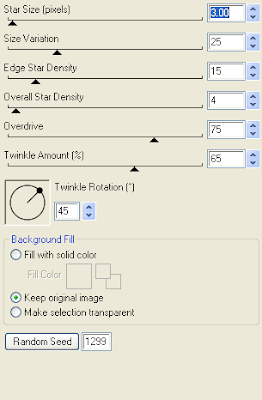
Repeat with Floral Bow, this time resizing 35% twice. Position top right hand corner of your frame.
Copy and paste Word Doodle & resize 50% twice. Adjust/add remove noise/add noise/monochrome random checked/75%. I then added the following gradient glow twice & then drop shadow.
Scrap Kit of Choice .. I have used a great PTU Kit from Heartfelt Perfections called "Festive Christmas" which can be purchased here.
Mask of Choice .. I have used WSL_Mask84 which can be downloaded here.
Font of Choice .. Santa's Sleigh
Let's get started
New image 600x600 and floodfill with white. New raster layer, select all, paste into selection Paper 1. Select none. New mask layer from image, WSL_Mask84, invert transparency unchecked, and merge group.
Copy and paste Snowballs and resize 45% twice. Copy and paste Snowflake Glitter and resize 65% & then 60%. Layer duplicate and merge down both Snowflake layers. Layer duplicate and mirror.
Copy and paste Frame and resize 55% twice. Using your magic wand, select the center portion of your frame, selections modify/expand 5, copy and paste Paper 5 below your frame layers, resize 40% twice, selections invert and hit delete. Do not deselect.
Copy and paste below your frame your tube & resize as necessary. Hit delete, select none. Drop shadow your tube & frame. I have used 2/2/40/4 throughout.
Copy and paste Leaf 2, resize 45% twice & drop shadow. Position bottom left hand corner of your frame. Layer duplicate & mirror.
Copy and paste Branch, resize 35% twice & drop shadow. Position bottom right corner at the bottom of your other leaf. Layer duplicate & mirror.
Copy and paste Silver Ribbon, resize 45% twice, flip & drop shadow. Position along the bottom.
Copy and paste Ribbon, resize 40% twice & drop shadow. Position along the top of your frame. Layer duplicate, mirror & flip.
Copy and paste Felt Star, resize 35% twice & drop shadow. Position in the centre of your ribbon at the top of your frame.
Copy and paste Floral Swag & resize 40% twice. Select all/float/defloat and add the following constellation setting and then drop shadow. Position along the bottom of your frame.

Repeat with Floral Bow, this time resizing 35% twice. Position top right hand corner of your frame.
Copy and paste Word Doodle & resize 50% twice. Adjust/add remove noise/add noise/monochrome random checked/75%. I then added the following gradient glow twice & then drop shadow.

X out white background, merge visible. Open white background, resize to your liking (I have used 500x500).
Add copyright and name on your tag. I have used Santa's Sleigh, Size 60, color #720807 and then added the same noise and gradient glow as I used on the word art followed by drop shadow.
Save and you are done.
I hope you have enjoyed my tutorial.
Pls feel free to experiment and use my tutorial as a guide
Friday, November 4, 2011
Dreams Do Come True Tut
5:41 PM | Posted by
Shal |
Edit Post
Edit Post

Feel free to use my tutorial as a guide and have fun giving it your own spin.
This tutorial assumes you have a working knowledge of PSP.
Needed Supplies
Tube of Choice .. I am using the work of Maigan Lynn which you must have a license to use. Please do not use her work without purchasing through CDO here. Maigan's work will be available there shortly.
I am licensed through My Tag Art which is now closed.
Scrap Kit of Choice .. I have used a great PTU Kit from Gina's Gems called "Fairytale Dreams" which can be purchased here.
Mask of Choice .. I have used WSL_Mask84 & WSL_Mask75 which can be downloaded here.
Font of Choice .. Cutie Pop
Let's get started
New image 600x600 and floodfill with white. New raster layer, select all, paste into selection Paper 26. Select none. New mask layer from image, WSL_Mask84, invert transparency unchecked, and merge group.
Repeat this time using Paper 25 and mask WSL_Mask75. Resize 110% and adjust/add remove noise/add noise/random monochrome checked/75%.
Copy and paste Clouds, resize 65& & drop shadow. I have used 2/2/40/4 throughout. Position along the top.
Copy and paste Butterfly Dot Doodle, resize 65% & drop shadow. Repeat with Brush 1 and mirror.
Copy and paste Frame 1 & resize 55%. Using your magic wand, select the center portion of your frame, selections modify/expand 5, copy and paste Paper 15 below your frame layers, resize 65%, selections invert and hit delete. Do not deselect.
Copy and paste below your frame your tube & resize as necessary. Layer duplicate and drag this layer above your frame. On the tube layer below you frame, hit delete. Select none. Select the tube layer above your frame and erase the bottom portion of the tube so it appears to be coming out of your frame.
Drop shadow your frame. Copy and paste Gingham Ribbon 3, resize 65 & drop shadow. Position along the bottom. Repeat with Gingham Ribbon 2 & flipping. Repeat Bow 1 & position bottom centre of your frame.
Copy and paste Creeper Vine 2, resize 65% & drop shadow. Position on the right hand side.
Copy and paste Magical Flowers, resize 50%, mirror, rotate right 25 & drop shadow. Position on your vine. Layer duplicate & resize 65%. Position next to your first flowers.
Copy and paste Bow Element, resize 65 & drop shadow. Position on top of your flowers.
Copy and paste Sparkles, resize 65% & position towards the bottom.
Copy and paste Butterfly 1, resize 30% & drop shadow. Position top right hand corner.
Copy and paste Heart 1, resize 40%, rotate left 25 & drop shadow.
Copy and paste Word 3 & resize 65%. I then added a size 5 fat white gradient glow & then drop shadow.
X out white background, merge visible. Open white background, resize to your liking (I have used 500x500).
Add copyright and name on your tag. I have used Cutie Pop, Size 20 & Color #2886db.
Save and you are done.
I hope you have enjoyed my tutorial.
Pls feel free to experiment and use my tutorial as a guide
This tutorial assumes you have a working knowledge of PSP.
Needed Supplies
Tube of Choice .. I am using the work of Maigan Lynn which you must have a license to use. Please do not use her work without purchasing through CDO here. Maigan's work will be available there shortly.
I am licensed through My Tag Art which is now closed.
Scrap Kit of Choice .. I have used a great PTU Kit from Gina's Gems called "Fairytale Dreams" which can be purchased here.
Mask of Choice .. I have used WSL_Mask84 & WSL_Mask75 which can be downloaded here.
Font of Choice .. Cutie Pop
Let's get started
New image 600x600 and floodfill with white. New raster layer, select all, paste into selection Paper 26. Select none. New mask layer from image, WSL_Mask84, invert transparency unchecked, and merge group.
Repeat this time using Paper 25 and mask WSL_Mask75. Resize 110% and adjust/add remove noise/add noise/random monochrome checked/75%.
Copy and paste Clouds, resize 65& & drop shadow. I have used 2/2/40/4 throughout. Position along the top.
Copy and paste Butterfly Dot Doodle, resize 65% & drop shadow. Repeat with Brush 1 and mirror.
Copy and paste Frame 1 & resize 55%. Using your magic wand, select the center portion of your frame, selections modify/expand 5, copy and paste Paper 15 below your frame layers, resize 65%, selections invert and hit delete. Do not deselect.
Copy and paste below your frame your tube & resize as necessary. Layer duplicate and drag this layer above your frame. On the tube layer below you frame, hit delete. Select none. Select the tube layer above your frame and erase the bottom portion of the tube so it appears to be coming out of your frame.
Drop shadow your frame. Copy and paste Gingham Ribbon 3, resize 65 & drop shadow. Position along the bottom. Repeat with Gingham Ribbon 2 & flipping. Repeat Bow 1 & position bottom centre of your frame.
Copy and paste Creeper Vine 2, resize 65% & drop shadow. Position on the right hand side.
Copy and paste Magical Flowers, resize 50%, mirror, rotate right 25 & drop shadow. Position on your vine. Layer duplicate & resize 65%. Position next to your first flowers.
Copy and paste Bow Element, resize 65 & drop shadow. Position on top of your flowers.
Copy and paste Sparkles, resize 65% & position towards the bottom.
Copy and paste Butterfly 1, resize 30% & drop shadow. Position top right hand corner.
Copy and paste Heart 1, resize 40%, rotate left 25 & drop shadow.
Copy and paste Word 3 & resize 65%. I then added a size 5 fat white gradient glow & then drop shadow.
X out white background, merge visible. Open white background, resize to your liking (I have used 500x500).
Add copyright and name on your tag. I have used Cutie Pop, Size 20 & Color #2886db.
Save and you are done.
I hope you have enjoyed my tutorial.
Pls feel free to experiment and use my tutorial as a guide
Rustic Steampunk Tut
3:16 PM | Posted by
Shal |
Edit Post
Edit Post

Feel free to use my tutorial as a guide and have fun giving it your own spin.
This tutorial assumes you have a working knowledge of PSP.
Needed Supplies :
Tube of Choice .. I am using the work of Pinup Toons which you must have a license to use. Please do not use this work without purchasing through CDO here.
Scrap Kit of Choice .. I have used a great PTU Kit from Tootypup called "Rustic Autumn" which can be purchased here.
Mask of Choice .. I have used WSL_Mask84 which can be downloaded here.
Font of Choice .. Steampunk
Let's get started
New image 600x600 and floodfill with white. New raster layer, select all, paste into selection Paper 7. Select none. New mask layer from image, WSL_Mask84, invert transparency unchecked, and merge group.
Copy and paste Steampunk05, resize 50% & drop shadow. I have used 2/2/40/4 throughout. Position top left hand corner. Copy and paste FlowerDeco02, resize 50% & drop shadow. Position on the right hand side.
Copy and paste Bronzegear02 & resize 50%. Using your magic wand, select the center portion of your frame, selections modify/expand 5, copy and paste Paper 9 below your frame layers, resize 50%, selections invert and hit delete. Select none and drop shadow your frame.
Copy and paste Deco01, resize 40% & drop shadow. Position bottom right hand corner. Copy and paste Key05, resize 50% & drop shadow. Position along the top of your frame. Copy and paste Keyringcluster3, resize 50% & drop shadow. Position on the left hand side of your frame. Copy and paste Rustic Heart4, resize 35% & drop shadow. Position bottom left hand corner of your frame.
Copy and paste your tube, resize as necessary & drop shadow.
Copy and paste HotAirBalloon03, resize 30% & drop shadow. Position top right hand corner.
Copy and paste Butterfly02, resize 30% twice & drop shadow. Position top left hand corner. Layer duplicate, mirror & position bottom right hand corner.
Copy and paste Tag Steampunk01, resize 65%, rotate left 115 & drop shadow. Position bottom right hand corner.
X out white background, merge visible. Open white background, resize to your liking (I have used 500x500).
Add copyright and name on your tag. I have used Steampunk font, Size 48, Color #24130a and then added the following inner bevel followed by a size 5 fat color #b4865a gradient glow followed by drop shadow.
This tutorial assumes you have a working knowledge of PSP.
Needed Supplies :
Tube of Choice .. I am using the work of Pinup Toons which you must have a license to use. Please do not use this work without purchasing through CDO here.
Scrap Kit of Choice .. I have used a great PTU Kit from Tootypup called "Rustic Autumn" which can be purchased here.
Mask of Choice .. I have used WSL_Mask84 which can be downloaded here.
Font of Choice .. Steampunk
Let's get started
New image 600x600 and floodfill with white. New raster layer, select all, paste into selection Paper 7. Select none. New mask layer from image, WSL_Mask84, invert transparency unchecked, and merge group.
Copy and paste Steampunk05, resize 50% & drop shadow. I have used 2/2/40/4 throughout. Position top left hand corner. Copy and paste FlowerDeco02, resize 50% & drop shadow. Position on the right hand side.
Copy and paste Bronzegear02 & resize 50%. Using your magic wand, select the center portion of your frame, selections modify/expand 5, copy and paste Paper 9 below your frame layers, resize 50%, selections invert and hit delete. Select none and drop shadow your frame.
Copy and paste Deco01, resize 40% & drop shadow. Position bottom right hand corner. Copy and paste Key05, resize 50% & drop shadow. Position along the top of your frame. Copy and paste Keyringcluster3, resize 50% & drop shadow. Position on the left hand side of your frame. Copy and paste Rustic Heart4, resize 35% & drop shadow. Position bottom left hand corner of your frame.
Copy and paste your tube, resize as necessary & drop shadow.
Copy and paste HotAirBalloon03, resize 30% & drop shadow. Position top right hand corner.
Copy and paste Butterfly02, resize 30% twice & drop shadow. Position top left hand corner. Layer duplicate, mirror & position bottom right hand corner.
Copy and paste Tag Steampunk01, resize 65%, rotate left 115 & drop shadow. Position bottom right hand corner.
X out white background, merge visible. Open white background, resize to your liking (I have used 500x500).
Add copyright and name on your tag. I have used Steampunk font, Size 48, Color #24130a and then added the following inner bevel followed by a size 5 fat color #b4865a gradient glow followed by drop shadow.

Save and you are done.
I hope you have enjoyed my tutorial.
Pls feel free to experiment and use my tutorial as a guide
Subscribe to:
Posts (Atom)
Kits & Tuts





Blogs I Love