About Me
My hobbies are PSP.
I love helping my friends who are starting with PSP.
Any similarity or resemblance to any other tutorial is purely coincidental and unintentional. Pls do not recopy my tutorials anywhere. Many thanks Susan.


Credit
Blinkie created by Rabid Designz. She does some amazing work ! Thanks so much Melissa.

Blinkie created by my long time friend tweety here. Thanks so much my friend :)
My blog was designed By Alika's Scraps. Thanks so much. You did an amazing job !

Sunday, January 8, 2012
 Cute Is What I Aim For Tut
1:05 AM | Posted by
Shal |
 Edit Post
Edit Post

Feel free to use my tutorial as a guide and have fun giving it your own spin.
This tutorial assumes you have a working knowledge of PSP.
Needed Supplies :
Tube of Choice .. I am using the work of Lollipop Labs which you must have a license to use. Please do not use her work without purchasing through SNC here.
Scrap Kit of Choice .. I have great PTU kit from Pink Candy Designs called "Emo Cutie" which can be purchased here.
Mask of Choice .. I have used WSL_Mask117 which can be downloaded here.
Word art of choice .. I have used word art by Brutal Designs which can be downloaded here.
Font of Choice .. 2 Peas Typo
Let's get started
New image 600x600 and floodfill with white. New raster layer, select all, paste into selection Paper 1. Select none. New mask layer from image, WSL_Mask117, invert transparency unchecked, and merge group.
Copy and paste Glitter, resize 65% & position top left hand corner. Layer duplicate mirror. Merge down both glitter layers, layer duplicate & flip.
Copy and paste Shiny sprinkle & position top right hand corner. Layere duplicate and mirror. Merge down both sprinkle layers, layer duplicate & flip.
Copy and paste Splat and position top centre. Copy and paste Splat 2, resize 65% & position bottom right hand corner. Repeat with Splat 3 & position bottom left hand corner.
Copy and paste Frame 2 & resize 90%. Using your magic wand, select the center portion of your frame, selections modify/expand 5, copy and paste Paper 5 below your frame layer, resize 75%, selections invert, hit delete. Copy and paste Wire & hit delete. Copy and paste Flame 2, hit delete & select none. Drop shadow your frame, wire & flame. I have used 2/2/40/4 throughout.
Copy and paste Cane, resize 65%, mirror & drop shadow. Position on the left hand side.
Copy and paste Keychain, resize 65% & drop shadow. Position top left hand corner. Copy and paste Bow 3, resize 50% & drop shadow. Position at the top of your keychain.
Copy and paste Winged Skull, resize 50% & drop shadow. Position top right hand corner.
Copy and paste Pearl Swirl, resize 65% & drop shadow. Position along the bottom. Repeat with Ribbon 2 and position bottom right hand corner. Layer duplicate, rotate right 90 and position along the right hand side.
Copy and paste Ribbon 3, mirror & position bottom left hand corner.
Copy and paste your tube, resize as necessary & drop shadow.
Copy and paste Cupcake 2, resize 50% & drop shadow. Position bottom right hand corner. Repeat with Butterfly and position at the top of your cupcake.
Open your word art in psp, duplicate & close original. Delete credit layer. Select Raster layer 3, adjust color balance/manual color correction from #e90fb3 to #713583. Adjust/add remove noise/add noise/gaussian monochrome checked/65%. Select Raster 5 layer and using your magic wand select the pink heart only. Repeat the color correction and noise effect as used on the first layer. Select none.
This tutorial assumes you have a working knowledge of PSP.
Needed Supplies :
Tube of Choice .. I am using the work of Lollipop Labs which you must have a license to use. Please do not use her work without purchasing through SNC here.
Scrap Kit of Choice .. I have great PTU kit from Pink Candy Designs called "Emo Cutie" which can be purchased here.
Mask of Choice .. I have used WSL_Mask117 which can be downloaded here.
Word art of choice .. I have used word art by Brutal Designs which can be downloaded here.
Font of Choice .. 2 Peas Typo
Let's get started
New image 600x600 and floodfill with white. New raster layer, select all, paste into selection Paper 1. Select none. New mask layer from image, WSL_Mask117, invert transparency unchecked, and merge group.
Copy and paste Glitter, resize 65% & position top left hand corner. Layer duplicate mirror. Merge down both glitter layers, layer duplicate & flip.
Copy and paste Shiny sprinkle & position top right hand corner. Layere duplicate and mirror. Merge down both sprinkle layers, layer duplicate & flip.
Copy and paste Splat and position top centre. Copy and paste Splat 2, resize 65% & position bottom right hand corner. Repeat with Splat 3 & position bottom left hand corner.
Copy and paste Frame 2 & resize 90%. Using your magic wand, select the center portion of your frame, selections modify/expand 5, copy and paste Paper 5 below your frame layer, resize 75%, selections invert, hit delete. Copy and paste Wire & hit delete. Copy and paste Flame 2, hit delete & select none. Drop shadow your frame, wire & flame. I have used 2/2/40/4 throughout.
Copy and paste Cane, resize 65%, mirror & drop shadow. Position on the left hand side.
Copy and paste Keychain, resize 65% & drop shadow. Position top left hand corner. Copy and paste Bow 3, resize 50% & drop shadow. Position at the top of your keychain.
Copy and paste Winged Skull, resize 50% & drop shadow. Position top right hand corner.
Copy and paste Pearl Swirl, resize 65% & drop shadow. Position along the bottom. Repeat with Ribbon 2 and position bottom right hand corner. Layer duplicate, rotate right 90 and position along the right hand side.
Copy and paste Ribbon 3, mirror & position bottom left hand corner.
Copy and paste your tube, resize as necessary & drop shadow.
Copy and paste Cupcake 2, resize 50% & drop shadow. Position bottom right hand corner. Repeat with Butterfly and position at the top of your cupcake.
Open your word art in psp, duplicate & close original. Delete credit layer. Select Raster layer 3, adjust color balance/manual color correction from #e90fb3 to #713583. Adjust/add remove noise/add noise/gaussian monochrome checked/65%. Select Raster 5 layer and using your magic wand select the pink heart only. Repeat the color correction and noise effect as used on the first layer. Select none.

Copy merged and paste onto your tag. Position top left hand corner. Add the following gradient glow.
X out white background, merge visible. Open white background, resize to your liking (I have used 500x500).
Add copyright and name on your tag. I have used 2 Peas Typo, Size 40, color #713583 and then added the same noise effect, gradient glow & drop shadow as used before.
Save and you are done.
I hope you have enjoyed my tutorial.
Pls feel free to experiment and use my tutorial as a guide.
 Labels:

Wednesday, January 4, 2012
Tuts using my "Cordelia's Chilly Christmas" & "Jingle Jangle" Tagger Size Kits
7:17 PM | Posted by
Shal |
Edit Post
Edit Post

My dear sweet friend tweety wrote this gorgeous tutorial using my "Jingle Jangle" tagger size kit. It's absolutely gorgeous ! You can find her tutorial here. Thanks so much my dear friend.

She then wrote this adorable tutorial using my "Cordelia's Chilly Christmas" tagger size kit. Just adorable. You can find this tutorial here. Thanks so much my dear friend again.
Tag using my "Loving You" Tagger Size Kit
7:11 PM | Posted by
Shal |
Edit Post
Edit Post

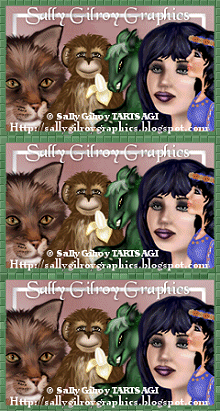
My good friend Sally Gilroy has created this gorgeous tag using my latest Valentine themed kit "Loving You". Thanks so much for using my kit Sally .. it's gorgeous !
Spotlight Designer at Twilight Scraps
7:03 PM | Posted by
Shal |
Edit Post
Edit Post

I was lucky enough to be selected as Spotlight Designer over at Twilight Scraps !!!
Until January 14th I will be having a great big .99 cents sale exclusively there !
So drop by my store and see if something catches your eye !
Jingle Jangle Tagger Size Kit
6:04 PM | Posted by
Shal |
Edit Post
Edit Post

Jingle Jangle Tagger Size Kit
This kit contains 30 papers (800x800 in size) & 89 elements. Elements include bows, buttons, flakes, frames, ornaments, poinsettias, ribbons, stockings and a variety of holiday themed elements that include trees, pine cones & branches, an adorable little elf set, some holiday hangers and more.
A bright beautiful holiday kit to deck the halls with.
A bright beautiful holiday kit to deck the halls with.
Available now at Heartfelt Perfections, Twilight Scraps & Wilma4ever.
Tuesday, January 3, 2012
Piling Up The Memories Tut
7:32 PM | Posted by
Shal |
Edit Post
Edit Post

Feel free to use my tutorial as a guide and have fun giving it your own spin.
This tutorial assumes you have a working knowledge of PSP.
Needed Supplies :
Tube of Choice .. I am using the work of Sweet-PinUp which you must have a license to use. Please do not use her work without purchasing through The doll Shop here.
Scrap Kit of Choice .. I have used a gorgeous FTU kit by Fantasy Moments called "Midnight Sky" which you can download here.
Mask of Choice .. I have used WSL_Mask84 & WSL_Mask366 which can be downloaded here.
Word art of choice .. I have used word art by Word Art Fun which can be downloaded here.
Font of Choice .. Cutie Pie
Let's get started
New image 600x600 and floodfill with white. New raster layer, select all, paste into selection Paper 4. Select none. New mask layer from image, WSL_Mask84, invert transparency unchecked, and merge group. Resize 110%.
Repeat using Paper 6 & mask WSL_Mask366.
Duplicate twice and rename your layers Mask 1,2 and 3. On your first Mask layer apply Dsb Flux/Bright Noise/65. On your 2nd layer, apply bright noise again, hitting mix twice. On your 3rd layer, apply again hitting mix 3 times. If you are deciding not to animate, skip this part of the tutorial
Copy and paste Element 23 & resize 55%. Using your magic wand, select the center portion of your frame, selections modify/expand 5, copy and paste Paper 1 below your frame layer, resize 65%, selections invert, hit delete & select none. Drop shadow your frame. I have used 2/2/40/4 throughout.
Merge down the frame with it's background layer. Layer duplicate and rotate right 25. Layer duplicate and mirror. I also dragged the first frame layer to the top.
Copy and paste Element 42, resize 65% twice & drop shadow. Position at the bottom of your frame.
Copy and paste Element 50, resize 40% & drop shadow. Position top centre of your frame. Copy and paste Element 6, resize 50% & drop shadow. Position hanging from top right hand corner of your frame. Copy and paste Element 17, resize 30% & drop shadow. Position at the top of your heart chain.
Copy and paste Element 32, resize 50% & drop shadow. Position bottom right hand corner. Copy and paste Element 45, resize 30% & drop shadow. Position bottom right hand corner. Repeat with Elements 47 & 48 and position next to your first flower.
Copy and paste Element 12, resize 30%, rotate left 30 & drop shadow. Position next to your flowers.
Copy and paste Element 77 & drop shadow. Centre. Copy and paste Element 63, resize 50%, mirror & drop shadow. Position bottom left hand corner.
Copy and paste your first tube layer, resize 50%/55% & drop shadow. Position sitting inside your top frame layer. Copy and paste your 2nd tube layer, resize 40% twice, mirror, rotate right 30 & drop shadow. Position top left hand corner.
Copy and paste your word art & resize 40% twice. I then added a size 6 fat color #f1b09b gradient glow. Select all/float/defloat/modify contract 6/invert and then adjust/add remove noise/add noise/monochrome gaussian checked/65%. Select none and drop shadow.
At this point if you need to, resize your tag. I have used 500x500. Add your copyright and name. I have used Cutie Pie, size 60 black. I then added all the same effects as were added to the word art.
If you are choosing not to animate, then you can save your tag.
To animate, close off Mask Layers 2 & 3 (the lil eye icon in your layer palette), Edit/Copy Merged and paste as new animation in Animation Shop. Close off Mask Layer 1 and open Mask Layer 2, Edit/Copy Merged and paste after current frame in AS. Close off Mask Layer 2 and open Mask Layer 3, Edit/Copy Merged and paste after current frame in AS.
Save as a gif.
I hope you have enjoyed my tutorial.
Pls feel free to experiment and use my tutorial as a guide.
Please feel free to send me your results.
I'd love to see what you came up with.
This tutorial assumes you have a working knowledge of PSP.
Needed Supplies :
Tube of Choice .. I am using the work of Sweet-PinUp which you must have a license to use. Please do not use her work without purchasing through The doll Shop here.
Scrap Kit of Choice .. I have used a gorgeous FTU kit by Fantasy Moments called "Midnight Sky" which you can download here.
Mask of Choice .. I have used WSL_Mask84 & WSL_Mask366 which can be downloaded here.
Word art of choice .. I have used word art by Word Art Fun which can be downloaded here.
Font of Choice .. Cutie Pie
Let's get started
New image 600x600 and floodfill with white. New raster layer, select all, paste into selection Paper 4. Select none. New mask layer from image, WSL_Mask84, invert transparency unchecked, and merge group. Resize 110%.
Repeat using Paper 6 & mask WSL_Mask366.
Duplicate twice and rename your layers Mask 1,2 and 3. On your first Mask layer apply Dsb Flux/Bright Noise/65. On your 2nd layer, apply bright noise again, hitting mix twice. On your 3rd layer, apply again hitting mix 3 times. If you are deciding not to animate, skip this part of the tutorial
Copy and paste Element 23 & resize 55%. Using your magic wand, select the center portion of your frame, selections modify/expand 5, copy and paste Paper 1 below your frame layer, resize 65%, selections invert, hit delete & select none. Drop shadow your frame. I have used 2/2/40/4 throughout.
Merge down the frame with it's background layer. Layer duplicate and rotate right 25. Layer duplicate and mirror. I also dragged the first frame layer to the top.
Copy and paste Element 42, resize 65% twice & drop shadow. Position at the bottom of your frame.
Copy and paste Element 50, resize 40% & drop shadow. Position top centre of your frame. Copy and paste Element 6, resize 50% & drop shadow. Position hanging from top right hand corner of your frame. Copy and paste Element 17, resize 30% & drop shadow. Position at the top of your heart chain.
Copy and paste Element 32, resize 50% & drop shadow. Position bottom right hand corner. Copy and paste Element 45, resize 30% & drop shadow. Position bottom right hand corner. Repeat with Elements 47 & 48 and position next to your first flower.
Copy and paste Element 12, resize 30%, rotate left 30 & drop shadow. Position next to your flowers.
Copy and paste Element 77 & drop shadow. Centre. Copy and paste Element 63, resize 50%, mirror & drop shadow. Position bottom left hand corner.
Copy and paste your first tube layer, resize 50%/55% & drop shadow. Position sitting inside your top frame layer. Copy and paste your 2nd tube layer, resize 40% twice, mirror, rotate right 30 & drop shadow. Position top left hand corner.
Copy and paste your word art & resize 40% twice. I then added a size 6 fat color #f1b09b gradient glow. Select all/float/defloat/modify contract 6/invert and then adjust/add remove noise/add noise/monochrome gaussian checked/65%. Select none and drop shadow.
At this point if you need to, resize your tag. I have used 500x500. Add your copyright and name. I have used Cutie Pie, size 60 black. I then added all the same effects as were added to the word art.
If you are choosing not to animate, then you can save your tag.
To animate, close off Mask Layers 2 & 3 (the lil eye icon in your layer palette), Edit/Copy Merged and paste as new animation in Animation Shop. Close off Mask Layer 1 and open Mask Layer 2, Edit/Copy Merged and paste after current frame in AS. Close off Mask Layer 2 and open Mask Layer 3, Edit/Copy Merged and paste after current frame in AS.
Save as a gif.
I hope you have enjoyed my tutorial.
Pls feel free to experiment and use my tutorial as a guide.
Please feel free to send me your results.
I'd love to see what you came up with.
Sunday, January 1, 2012
Valentine Themed PTU Tagger Size Kits
12:12 PM | Posted by
Shal |
Edit Post
Edit Post


Christmas has come and gone .. we've rang in the New Year .. so what's next ! Well Valentine's Day of course and it's just around the corner. I have 2 Valentine's Themed Tagger Sized Kits for you.
"Loving You" contains 30 papers (800x800 in size) & 110 elements. Elements bows, butterflies, chains, charms, cupcakes, doodles, frames, ribbons, roses, strings, wrapped hearts & a huge variety of Valentine's themed elements that include flowers, jewels, gifts, treats and an adorable little devil.
"Blue For You" contains 25 papers (800x800 in size) & 101 elements. Elements bows, butterflies, chains, charms, cupcakes, doodles, frames, ribbons, roses, strings, wrapped hearts & a huge variety of Valentine's/Love themed elements that include flowers, jewels, gifts, treats and an adorable little bear.

In this specially priced bundle, you will receive my first 2 Valentine's Day themed tagger size kits "Love Is In The Air" & "On The Wings Of Love".
Available now at Heartfelt Perfections, Twilight Scraps & Wilma4ever. Soon to be available at ScrapsNCrap.
Subscribe to:
Posts (Atom)
Kits & Tuts





Blogs I Love